Showing posts with label tech. Show all posts

Razer Adaro In-Ears Analog Earphones Review


     Razer has always been known as the innovator in the gaming peripheral industry and it seems they are constantly expanding into a lot of different industries in the same horizon. While Razer has been no stranger to the audio side of things especially audio geared for gamers, the Adaro series seems to be their take on providing a satisfying audio experience for people other than gamers. Without further ado, let's get started with the review.

WHAT'S IN THE BOX

The earphones itself, 3 interchangeable ear-tips, a carrying case and product documentation.

TECH SPECS
  • Drivers: 10mm Neodymium Magnets
  • Frequency Response: 20Hz – 20kHz
  • Impedance: 32 Ω
  • Sensitivity @1kHz: 96dB ± 3dB
  • Input Power: 10 mV
  • Connector: Gold-Plated 3.5 mm Audio Jack
  • Cable Length: 1.3m
  • Approximate Weight: 22g

REVIEW
     Taking a quick look around the box, I notice there isn't a single 'Razer' branding around it other than the Razer logo on the front. It seems Razer is confident enough that the logo alone will allow people to recognize what brand of earphones the Adaro exactly is; or maybe at the same time establish Adaro as sort of a subsidiary brand itself. Of course, people acquainted with the Razer brand would instantly notice their signature Neon Green colour of the cabling from looking at the packaging itself.


     After the usual struggle while unpacking Razer products, we get to see the Adaro In-Ears in its entirety.The body housing the 10mm drivers are precision-milled out of aircraft grade aluminium and have rough diamond-cut edges. As much as the previous sentence sounded like something right out of a marketing handbook, I have to say, the earphones do feel very premium. The diamond-cut edges also gives the earphones a very nice accent compared to the renders shown on Razer's site. Of course the body also feels very robust and could pretty much stand any pressure applied in normal conditions eg. accidentally sitting on it.


     Moving along, we find the straight flat cable of the Adaro In-Ears. This helps with the tangling issue that users face with a lot of audio products. The flat cable make it easier to untangle after storing it and won't create 'loops' when users are using the earphones. At the end of the cable we find a right-angled 3.5mm audio jack (duh). I like the right-angled jack because the jack protrudes less and I use the Adaro In-Ears more frequently with my phone and pockets aren't exactly spacious with skinny pants these days. The audio jack is also gold-plated, slowing down the corrosion process of constant plug ins and outs, extending the usable lifetime of the Adaro In-Ears.


     The Adaro In-Ears also comes with 3 interchangeable ear-tips for the users to switch to their desire. The ear-tips have a range of sizes to fit different kinds of ears. For me, the default ear-tips already attached to the earphones fit me perfectly. Always nice to see interchangeable ear-tips, other than providing the perfect fit, these also extend the product's usable period for one can switch to another set of ear-tips when the other wears out.


     Let's get into the most important part of the review, the audio quality. As I have mentioned before, this particular pair of earphones sports 10mm neodymium drivers. On Razer's site, under the part where they talk about the drivers, they claim the Adaro In-Ears delivers "rumbling bass and crystal-clear highs". Fortunate to say, the earphones are what they claim to be. The entire music listening experience while using this pair of earphones is very immersive too as the ear-tips fit seal my ears pretty tight without being uncomfortable. One comment about the earphones would be the mids fall a bit flat but that is to be expected from earphones which I presume was geared towards bassheads/gamers. Talking about gamers, gaming with this particular pair of earphones is entirely possible with the added immersion that I've mentioned before. Unfortunately the Adaro In-Ears doesn't come with an in-line microphone like the Hammerhead Pro, so do be aware of this.


     Before I end this review, let's look at the carrying case that comes alongside the Adaro In-Ears. The case is what I consider as a hard carrying case but still one can push it in if large amounts of pressure is applied; if you are wondering if that will leave a dent in the case, the answer would be no. Anyhow, the case still presents itself as a much more secure way to bring your earphones around compared to throwing it straight into your pocket/bag. One side of the carrying case also has netting included, which I presume is used to store the extra ear-tips, so careless people like me can stop worrying where I misplaced them.

CONCLUSION
     In a nutshell, seeing from all the points I have written above, the Adaro In-Ears presents itself as a pretty decent pair of earphones for bassheads and gamers on the move; however, that is before we look at the price tag. The Razer Adaro In-Ears retails at MYR 319.00 according to Razer's online store but I got mine for MYR 299.00 at Low Yat Plaza. In my opinion, that's a very premium price for a pair of wired earphones; I could have gotten one of Plantronics wireless offerings at that range. Unless you absolutely love the aesthetics of the Adaro In-Ears, I suggest that you check out offerings from other brands as I believe you can easily find such audio quality within the sub RM250 range of earphones too.

Are you willing to switch to a smartwatch?


    With the recent announcement of Android Wear, the official Android flavour for wearable devices alongside the pioneers which will be among the first to utilize the OS, more notably Motorola's Moto360, it got me thinking: "How many people will actually take the leap?"

The Tag Heuer Carrera Calibre 1887
     Well for myself, I bought one of those fancy swiss watches, to be specific, a Tag Heuer, the swiss watch for hipsters apparently. The Moto360 is expected to arrive at a price as high of $400 which costs about a sixth of a watch with Tag Heuer branding. I expect if Malaysia ever gets to see the Moto360 officially launch over here, it will come slapped with a price tag of about MYR 1599 which is still pretty reasonable for an early adopter I suppose.

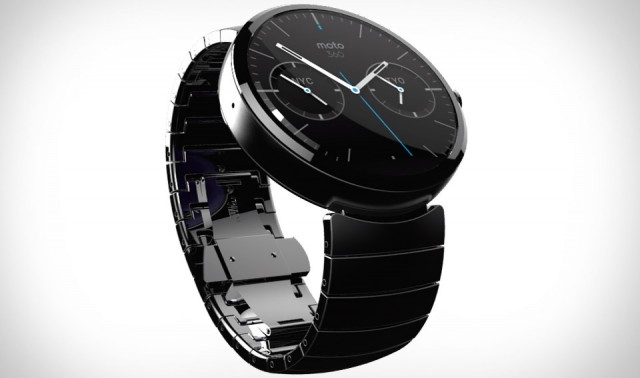
The elegant looking Moto360
     However, am I jumping the gun? Comparing a smartwatch to a swiss watch, that's like comparing apples to oranges some might say. Let's see why people buy swiss watches, other than the number one reason which is snob appeal, the other reason would definitely be the elegant design of said timepieces; which brings us to one of the problems that people have with previous smartwatches, the design. Some say the design of previous smartwatches looked like it was meant for nerds only, which I wholeheartedly agree. The lack of appeal to the masses have resulted in a slow adoption rate of the product line. The original Pebble, while being an innovator, to be honest, resembled those hippy kid watches, like ODM watches, which I hate to admit, at some point in time owned one too.
The first generation Pebble
vs
ODM, close enough?
     Things seem to be changing for the better, seeing how the initial renders of the Moto360 are, I'm pretty confident that they have finally nailed the design aspect in order to appeal to the general public. They are using sapphire glass too, which is the same material that they use for swiss watches. With sapphire glass, the watch face will definitely look crisp clear; which brings us into another point that we should consider, the display and the battery life of such a device.

A smartwatch that actually is a watch when it's needed
     Wearing my current watch, I can check the time no matter the condition, pitch black or blaring bright. If you have used your smartphone under the sun, it is a common problem that most have difficulty seeing what is actually being displayed. Okay, let's say the upcoming smartwatches have a display that can counter this problem, how about the battery life of such devices. With a digital display that is constantly on, one would figure that the battery will probably go dry in a day or so. Compared to an automatic watch that runs on the sole action of wearing it, the smartwatch seems quite troublesome if one has to charge it everyday. Of course, the added features the smartwatch will have is to be considered too, so what I ask of is a battery life of 2 or 3 days and I will be sold on this idea.
Something the typical swiss watch can't do
     Am I excited about the idea of premium looking smartwatches that are actually meant for serious people? Definitely. Am I going to get one as soon as it's available? Not necessarily. With the arguments I presented atop, how do you feel about the emergence of smartwatches? Are you willing to stop wearing the swiss watch that you invested so much in? Do leave your thoughts below.

NVIDIA announces TITAN Z - A supercomputer in itself


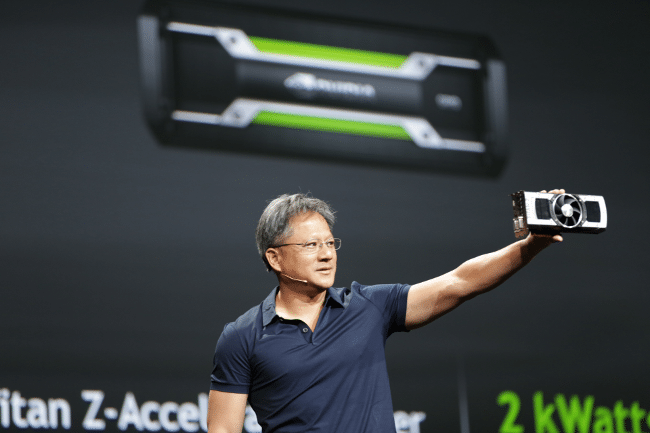
     How much VRAM is enough VRAM? Apparently after the 6GB GTX TITAN came along, NVIDIA were asking themselves where to improve upon such a beast; which instead of colouring it black, they resorted to upping the standards again with the GTX TITAN Z that features a whopping 12GB worth of VRAM.


     The TITAN Z runs on two GK110 chips, which sums up to 5760 processing cores. That's so much CUDA you probably have problem holding yourself together. The card is engineered for the next generation of 5K and multi-monitor gaming.

     Of course with that power, comes great responsibility price tag, while NVIDIA didn't explicitly state a price tag in their post, the powerhouse of a card is said to be retailing at a whopping $3000 which I think when it finally arrives to Malaysia, will fetch a price upwards of MYR 10,000. Better start saving up now NVIDIA fanatics, true to life texture awaits you.

kenysl.com @ ALCATEL ONETOUCH IDOL X+ / IDOL ALPHA Launch Event

the setting in Skyroom, Federal Kuala Lumpur

Alcatel OneTouch Idol X+ To Launch In Malaysia This Friday


     Another pleasant surprise as I am invited to attend the launch event for Alcatel One Touch Idol X+. Alongside with the Idol X+,  the Idol Alpha will also be present at the event too.

     In the invitation, the word 'true Octa-core' stands out from the rest of the text. I think everyone has heard about Samsung's Exynos processor that is also technically Octa-core but in truth only a Quad-core. For Alcatel OneTouch to use such wordings.... truly an interesting sight to behold. Well, I will only know when I get my hands on the Idol X+ so stay tuned on kenysl.com :)

Resolution wars: How many pixels does one really need?


     If you have been paying attention to technology news of any sort, you would notice that a lot of new products ranging from mobile phones to notebooks have one same buzzword, a higher resolution than 1080p. So the question I'm posing to you all is, how many pixels is actually enough pixels?

     From the past few or so weeks, we have been getting information about new products that are bound to be released; and all of them have something roughly in common, a resolution higher than the FHD standard (1920x1080). Examples of this phenomena would be the Razer Blade 14' (2014) that bolsters a resolution of 3200 x 1800 alongside with the MSI GS60 Stealth that features an optional 3K display. That's on the notebook side, for the mobile sides of things, we find the OPPO Find 7 with a 2560x1440 display and also the recent G3 rumours claiming it to feature a 3K display.
supposed picture of the OPPO Find 7
MSI GS60
     How many pixels does one need though? Personally, I feel that the more pixels we can smush into a display, the better it is. On larger displays like the common 15.6" display featured on most notebooks, I really think it's a necessity at this point. On the mobile side of things though, people seem to be more resistant to leap forward to higher resolutions. Most claim that the battery life of phones are already very watered down with the non-stop progress made by phone manufacturers in other departments like display, processor and etc. But one has to bear in mind, when we were making the transition to 1080p displays on mobile phones, people were questioning the need to transition into FHD, and now look at where we are, most can't even live with a lower resolution on mobile (myself included). 

     Perhaps this is some food for thought, how many pixels does one truly need? My answer would be we will never have enough pixels. What's yours? 

LG G Pro 2 - Ken's Phone Lookout


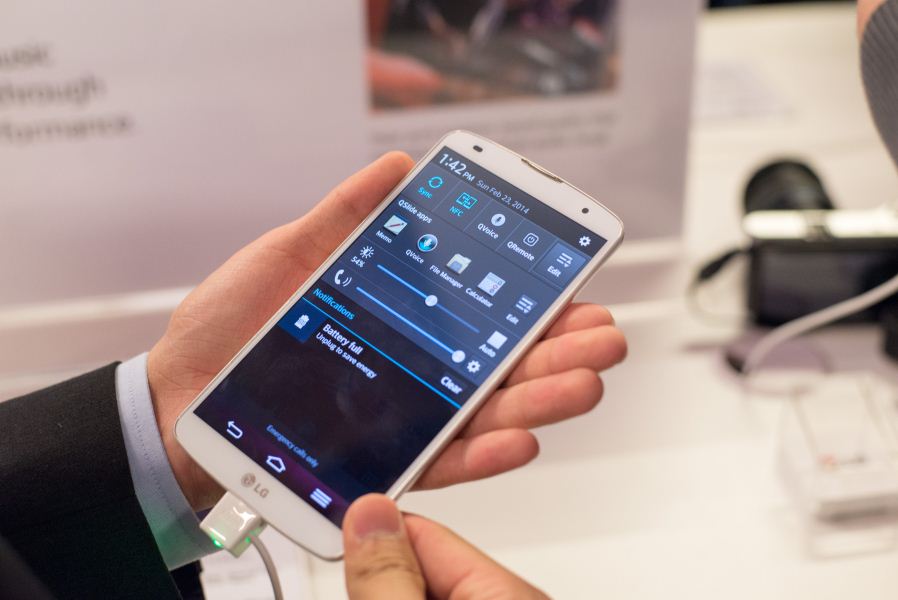
     So we finally got to see what LG had installed for us for the phablet section of the mobile market; and without disappointment, we are presented with the LG G Pro 2, a 5.9" 1080p phablet. Full specs down below.
The LG G Pro 2 packs Qualcomm Snapdragon 800 SoC with 2.26GHz quad-core CPU and 3GB of RAM. There are 16 or 32GB of built-in memory, which can be further expanded via microSD card slot. Connectivity options include LTE-A, Wi-Fi a/b/g/n/ac, NFC, Bluetooth 4.0, SlimPort, and microUSB port.
The 13MP camera of the LG G Pro 2 features enhanced optical image stabilization (OIS+) and the option to adjust the focus of a photo after its capture. Video recording capabilities include 4K UHD and 720p @ 120 fps. The front-facing camera is a 2.1MP unit
      If you are following me on other social media platforms, you would know that I'm getting pretty bored of what's coming out from MWC 2014 and this is one of the few new devices that got my attention. In my previous posts, I'm looking for a nice big device to replace my kinda worn out HTC One X, but you might say the previous devices I have mentioned are all >7". Well, I'm willing to make the sacrifice and go with a phablet instead. Then you would ask why don't I just go get a Samsung Galaxy Note 3 right this moment. As much as I love the S-Pen, I am still a tinker at the end of the day, meaning I would switch to AOSP ROMs at some point in time, and the S-Pen would be rendered useless by then.

     Well, the LG G Pro 2's software features/implementation is not that tedious compared to other skins. Certainly the settings menu color scheme would bug me, but with Google progressively releasing Android default apps, there might still be some hope, so one would only have to deal with the skinned settings menu and I'm willing to deal with that. Another awesome feature I look forward to is the knock code, check out the video below.


     So, what did your sharp eyes notice? Yes, it's a combination of the "knock knock" to wake plus a lockscreen passcode at the same time. Awesomesauce.

psst, LG send one to me please

kenysl.com @ OPPO N1 Launch Event


     As I have mentioned in the post a week ago, I was invited to attend the OPPO N1 Launch event happening at 18th February, KLCC.

The Waiting Game

     Have you ever been in a waiting game with that crush of yours? Fright not! I'm here to..... Hold on a second, this is a tech blog, ain't nobody wanna read about relationship advice on here (Ken is not qualified for such advice). So, what waiting game am I talking about? Of course, with MWC 2014 right around the corner, it has got to be something that is related to mobile technology!

i-Rocks Rock Series M09 Gaming Mouse & C10 Gaming Mousepad Review


     Here I come with another i-Rocks product review, and this time I'm giving you a double scoop by covering the Rock Series M09 Gaming Mouse and C10 Gaming Mousepad at the same time. Like the K10, the M09 and C10 are focused on the fundamentals. Lets dig into what the M09 and C10 is all about.

WHAT'S IN THE BOXES

The mouse, a piece of instruction for it and the mousepad.

TECH SPECS

M09 Mouse
  • USB Interface
  • Adjustable Resolution: 500 / 1000/ 1750 DPI
  • Adjustable Report Rate: 125 / 500 / 1000Hz
  • Dimension: 117(Length) x 66.5 (Width) x 41.5 (Height) mm
  • Cable Length: 180 cm

C10 Mousepad
  • Material : Fabric + Natural rubber
  • Dimension : 366 X 262 X 4 mm
REVIEW
   
     Checking out the M09 from the little window view of the box, the mouse bears a striking resemblance to the infamous Razer Deathadder. The black matte finish, the green accents, the shape and the list goes on and on about why it looks like the aforementioned, but today we are not here to talk about things like that, we are here to find out what the M09 is all about.
     Lets first give attention to the supporting role in what makes a wired mouse, the USB cable. Like you expected, we are given a gold-plated USB header, giving us the liberty to plug in and out as much as we like. The USB cable is also braided, making it easier to untangle if it does eventually tangle among itself. We also get a Velcro strap to manage the USB cable if one would like to bring the mouse along with them. Rejoice, people with OCD!
   
     After plugging in the USB, the M09 greets us by activating its LED lights. The LED illuminates the scroll wheel and the "ROCK" logo situated right under your palm when using the mouse. The LED illumination gives the M09 a boost in aesthetics, one minor complain though, is that there is a bit of "overshine" (coined that term), you can clearly see the shape of LED backlight, a square PCB I guess. Under bright light, you wouldn't be able to make out this shape clearly, but still, once you see it, you won't be able to unsee it.

     At the side of the M09, there are 2 side buttons. Unfortunately, it only functions as a "Back" and a "Forward" key to ease your web browsing since there is no software functionality to map macros onto the side buttons. The only saving grace is that games still recognize the two buttons as Mouse Buttons 4 and 5, giving you the option to remap simple controls onto it via game settings.

     When you learnt that the M09 has no software functionality, you might be gasping in fear, exclaiming your need to tweak the sensitivity of the mouse across all games and do not want to resort to shitty Windows settings. Fright not, flipping the mouse around, you are greeted with 2 switches, 1 for DPI settings, another for polling rate settings. There are only 3 settings for both DPI and polling rate, 500/1000/1750 for DPI and 125hz/500hz/1000hz. While it may seem a little scarce of choice, if you adjust the polling rate and DPI accordingly, you should surely meet your match, well unless you are running 4 monitors... And before I forget, the M09 sports a laser sensor but there is no information on exactly what laser sensor it uses.

     Now we come to the most important part, the ergonomics of the M09. If I were asked to describe the shape of the M09, I would be baffled for words. So I will put it in a simple way, this mouse sports the shape of your normal everyday mouse. The size of the mouse fits my hand nicely with a little bit of margin, but I have small Asian hands, so that might be a concern for you. After a long day at work using the M09, I feel no strain and the matte rubber finish feels nice. One gripe of mine with the mouse is that I wished that the sides were a little bit rougher compared to the other parts of the mouse, giving me a better grip for the mouse, but that differs from person to person.

     To enhance ones experience of using a great mouse, one should get a mousepad of equal quality. Fortunately enough, i-Rocks also released a mousepad, the C10, alongside with the M09. The C10 sports a design with more sharp edges than one would normally find on a mousepad. There is also a big "Rock series" graphic on the mousepad to let people know what mousepad you are using. Personally, I like simplistic designs like my QcK Mass, but each to his/her own of course.
     The C10 is made to be pretty silky smooth for the mouse to glide through with its fabric top. Other than making your mouse glide with almost no resistance, the smooth top of the C10 allows your hand to sit comfortably on it while in usage. Personally though, I prefer surfaces with a rougher finish for the higher resistance while using a mouse.

CONCLUSION
     If you haven't notice, I have still yet to mention the price of the M09. So if you haven't ran off googling, the M09 comes in at only SRP RM95. For it's price, I am pretty sure the M09 is a killer deal at that range. In my honest opinion, if you are looking for a value oriented mouse and don't fancy any of the software functionality that other name brands provide, the M09 presents itself as a pretty good pick for you. The mouse is also a pretty good pick-up for those who are picking out their first gaming mouse, as it will quickly introduce you to the world of gaming peripherals, especially its keyword, "Quality".
     For the C10, it comes it at SRP RM59, which in my opinion, is not to my liking. At that range, I would probably get a SteelSeries QcK Mass, but for those who prefer a much more smoother surface for more glide, the C10 is probably suitable for your taste.


Valentine's Day is here guys! Have a great date people!

i-Rocks Rock Series K10 Gaming Keyboard Review - Tactile... but not Mechanical??!

Trying out a new way of writing, send your feedback to kenyeohsl@gmail.com
   
     When you clicked on this post, you might be wondering who is i-Rocks. So let me do brief introduction to the brand. i-Rocks is a Taiwanese brand that's been producing IT-related peripherals that suit the needs of almost anyone, from IT workers to professional gamers.The peripherals that cater to the gamer audience is under the Rock Series. Recently, they expanded their operations that enables me to review this interesting keyboard. Let's dive deep into what the i-Rocks Rock Series K10 Gaming Keyboard is all about.

WHAT'S IN THE BOX, KEN?
The keyboard itself and a piece of product information

TECH SPECS
  • Interface: Full Speed USB
  • Polling Rate: 1000 Hz
  • Key number: 104 keys (by language)
  • Key stroke: 3.8±0.5mm
  • Key force: 55±15g
  • Switch life: about 20 million life cycles
  • Cable length: 180cm
  • Dimensions: 448 (L) x 148 (W) x 34(H) mm
  • Product weight: about 1.2kg
  • N-key Rollover with 30 keys trigger capability
  • Membrane key-switches with plunged key structure
REVIEW
the K10
     In case you haven't read the tagline of this review, let me inform you that the K10 is actually just a membrane keyboard. And if it were to be just a normal membrane keyboard, this review would reflect on how lackluster it would be. But, that is not the case.

     The K10, a membrane keyboard, actually has the touch and feel of using a mechanical keyboard, and to be exact, it feels and types like a keyboard with Cherry MX Red switches. The K10 features a switch they dubbed as the "POM key switches" which I had been googling for a good while now but can't turn up with any good resources so we would have to take it word for word from the company. With Cherry's patent being expired for a good while now. A lot of companies have taken the liberty of trying to develop their own key switch like ThermalTake (Tt eSports) with their recent revelation at CES 2014.

     From what I have been told, the POM key switch is i-Rocks take on developing their own switch without straying too far away from the normal membrane keyboard. From the few days of using this keyboard, I can tell you that they are doing a good job in giving the tactile feel that not too long ago, only mechanical keyboards could achieve.

why you heff to do this to me
     So now you know how much I love the tactile feel of this keyboard, but it is not like I don't have any gripes with it; One of it being the keyboard layout. Based on personal preference, you might be well acquainted with a short backspace key, but for myself, I have been typing as long as I could remember on keyboards with the more common long backspace key. It's something one would have to get used to, but mistakes would occur much more frequently using this layout in my honest opinion.

the backlit i-Rocks logo on the space bar and no, the red accent is not backlit
     Another thing I wished the K10 have had, media control keys. Personally, I just need volume control and that's it because my speakers don't have the nifty knob to turn volume up and down. But I guess that has to do with the plug n' play functionality and its limitations.

dat cable management
     It's not all bad for the K10, this keyboard features something I miss a lot while using the Razer Deathstalker, cable management lanes under the keyboard. One might question why you need cable management lanes under a keyboard, and I would tell you that it will make your desk less cluttered if you were to utilize it properly.

     The keyboard doesn't feature any software functionality like other name brand peripherals but it still has the essentials that a gamer might need. For an example, the K10 still has the Windows key lock a.k.a gaming mode. But the activation method is kind of unique compared to other keyboards. You just have to hold both left and right Windows keys down and 'tada' your Windows keys are now disabled, making it impossible to accidentally tab out of the game due to the mispress of the Windows key.

     Due to the plug n' play that i-Rocks is so keen to focus on, the K10 features a gold-plated USB. If you haven't heard yet, gold-plated USB headers don't give you the auto-winning edge, instead, it gives you the liberty to plug in and out much more times compared to normal USB headers reason being gold corrodes at a much more slower rate.

     Seeing the K10 is a gaming keyboard, i-Rocks is not forgetting about the essence of what defines a gaming keyboard, not shiny LEDs (which the K10 does not have), instead, its all about the n-key rollover (anti-ghosting) for 30 simultaneous key presses and 1000hz refresh rate. Let's go through the latter first. A keyboard having 1000 hertz refresh rate means that it only takes 1 millisecond for it to register your keystroke, which is important for that split second decision making while gaming.

dividing text with pictures proven to make posts look shorter
     Now you might be asking about what this n-key rollover or better known as anti-ghosting means. Ghosting basically means when you press multiple keys together, some keystrokes are not registered to the system. So the K10s' 30-key anti-ghosting lets you be able to press 30 keys together without losing any keystrokes in the process, and I am confident that you would never press 30 keys simultaneously in any serious situation.

everyone loves velcro... right?
     Something fresh that I really like about the K10 is the included Velcro strap. This Velcro strap is something I have yet to see implemented to a lot of peripherals with long cables, which to be honest, is really handy to have if you were to bring the K10 around with you, to save you from the living hell that is dangling cables all around your bag.

     But talking about lodging it around with you, the K10 weighs in at an astonishing 1.2kg. When I unboxed this keyboard, I was truly shocked by how hefty the keyboard felt. This would make bringing it around kinda hard to cope with if you are on the go constantly, but this certainly guarantees that the K10 is made of solid material and perhaps even made with a aluminium backplate as I can't seem to even make the keyboard flex, not even a little bit.

CONCLUSION

     After some sloppy structuring of this review, we have come to the part where I conclude stuff (some of you might even just read this part :( ). The i-Rocks Rock Series K10 comes in at only RM169, making it a very value oriented keyboard. I would wholeheartedly recommend the K10 to anyone looking to try out what a mechanical keyboard feels like in daily use but doesn't want to spend too much yet. I'm addicted to the tactile feel of this keyboard to the point that I don't have the motivation to type on my notebook's chiclet keyboard. While the K10 is not as full featured as other name brand keyboards with software support, the price and the tactile feel really makes it too good of a deal to let go. Therefore, the i-Rocks K10 is awarded the Editor's Choice award.

     Last review of the month guys! It's been a good start to a year and I hope that it progresses like this throughout the year. Happy Chinese New Year too to those who are celebrating!

Sonic Gear Pandora Micro Bluetooth Speaker Review


     "This is the second part of a three part series covering Sonic Gear's Pandora Bluetooth Speakers. Remember to check out the concluding overview that will be posted after all three reviews are up and running."

     Hello people, welcome back. Today I will be reviewing the Sonic Gear Pandora Micro, like the Pandora Mini, the Pandora Micro is also a portable Bluetooth audio solution. Without further ado, let's dive deep into what this tiny thing is all about.

WHAT'S IN THE BOX, KEN?
     The Pandora Micro, 3.5mm jack cable, MicroUSB to USB cable and a piece of instruction.

TECH SPECS
  • Bluetooth profile: support HS/HF, A2DP, AVRCP, OPP
  • Total system power: RMS 5 Watts
  • Impedance: 4Ω
  • Driver: 2 x 40mm
  • Frequency response: 100Hz ~ 20KHz
  • Speaker function: Bluetooth, AUX-in, and Micro-SD card music playback
  • Handsfree function
  • Built-in rechargeable battery: 5 hours continues music playback at mid-volume
DESIGN
green pumpkin reporting in
     My initial thought when unpacking the Pandora Micro is that it looks a lot like pumpkin, I swear if I coloured it orange and added a stem up on top that some animal would eventually try to claw through it. Jokes aside, the Pandora Micro is shaped much like an oval, unlike the other speakers in the Pandora series (Pandora 3: Rectangle, Pandora Mini: Rounded Rectangle). Unlike the Pandora 3 and Mini, the Micro's speaker is not knitted as closely and you can see the drivers inside.
The visible drivers
back I/O
     Turning the Pandora Micro around, there's not much to see. From the left, there is a MicroSD card slot which is nifty to have. A MicroUSB port in order to charge the speaker and then your power switch. The power switch toggles you between 3 modes, having the switch at the far right turns the speakers off, having it at the middle will have you in Bluetooth mode, and to the far left is MicroSD mode. There are also media controls on the top of the unit which I will dive deeper into in the next section.

FUNCTIONALITY
The media controls
     As I have just mentioned, the Pandora Micro also features media controls situated on top of the unit like his two bigger brothers in the Pandora series. Controls include: forwards, backwards, volume decrease and volume increase. Situated in the middle of these 4 controls, is a Bluetooth logo where you can use to pick up calls if your phone is connected to the speaker. If you have not notice already, I refrained from using the word 'button' because frankly it isn't one.
     There is literally no feedback when you press any of the controls, making you constantly doubt yourself if you are actually activating the control or not. While this may not be the biggest deal breaker ever, I would presume this as an oversight from Sonic Gear for the other speakers in the Pandora series all have buttons that give feedback.
      Compared to the stationary Pandora 3, the Micro has an effective range of 20 meters which is pretty impressive. I have tried out the range by walking the speaker down a corridor and I'm glad to say with no interruption, the audio does not jitter until the 20 meter mark. About the battery life, it lasted more than 5 hours for me but might differ depending on how high of a volume you are playing at. I was using it at perhaps the 40% volume mark, but it's hard to tell as there is no real indication.

AUDIO QUALITY
     Audio quality wise, there really isn't much to say. There's no bass that's for sure, and music doesn't sound exceptionally well with the Pandora Micro. What I would say though is that the Micro is able to stand it's ground against my laptop which has JBL speakers built-in. Quality wise it is quite comparable between the Micro and my built-in speakers, the only edge the Micro has over my default speakers is the maximum volume which may or may not matter to you.
     I have to say though, when you get to an even higher volume on the Micro, the sound quality will start to degrade a little if you listen closely but seeing as you are in a situation where you need to crank up the volume to that high, that you wouldn't be able to notice the change in quality.

CONCLUSION
     The Pandora Micro presents itself as a very powerful audio solution in a portable and small form factor. If you are looking for a simple audio solution that you can keep in your bag without compromising volume-wise or it being a headphone/in-ears, the Pandora Micro might just suit your needs. The Pandora Micro comes in at a kind of reasonable price of MYR125.00 . In my opinion though, unless you are going to have pseudo-random parties or dance practices, I would recommend you to go for a good pair of headphones or in-ears for a much more optimal experience.