Showing posts with label experience. Show all posts

Measuring Your PCs Performance (Guide & Thought Process)


     It's been about a month since I built the Puffer, As soon as I got it, I went along my merry way and just gamed through the weeks. Since my hype about my new rig is a tad more worn down now, I decided to stress test my PC to see how it's doing. If you want to read up on the rationale behind this build, read my build log over here.

     Before we get started, we have to get our tools ready. Below is the list of tools I have used thus far.


1. AI Suite 3. Adjust voltages and clock speeds without having to go through the hassle of booting into the BIOS. There's also a bunch of other goodies packed into the software. Awesome tool to utilize if you have an ASUS motherboard.

2. Realtemp. Just a simple and reliable temperature monitor.

3. AIDA64. I chose this over Prime95 due to... due to... actually I have no idea why but I went with AIDA64 anyway. Either one of these will work fine.

4. ASUS GPUTweak. One of the many GPU overclocking tools to choose from. I have an ASUS card so I figured I would use this instead of MSI Afterburner.

5. 3DMark. Bought this on the last steam sale. Of course synthetic benchmarks are not an accurate representation of how a rig will perform during real games. However, in this age of "screenshots or it didn't happen", 3DMark standardized benchmarks works better numbers wise.

6. Unigine Heaven Benchmark. I see a lot of reviewers use this to demonstrate their point so I guessed I would try it as well.

     Before I went around tweaking stuff, I did a dry run of AIDA64's stress test and to my surprise, my 4790K was throttling due to constantly hitting almost the 100C mark. After some intense Google searches, I figured that I didn't tighten my CPU block enough. After tightening the CPU block, I did another run, the throttling stopped, but the temps were still around 80C give or take 5C.

     After some further reading on the interwebs, I learned that my CPU voltage might be the culprit. Opening up AI Suite 3, my motherboard has default to using adaptive voltage which resulted in the CPU using about 0.2v more than the recommended voltage. After dialing down the CPU voltage to 1.130v, I also "underclocked" it to match the stock Intel settings of 3-cores 4.3GHz and 4-cores 4.2GHz instead of ASUS's default all cores 4.4GHz.


     With everything ready to rumble, I ran another AIDA64 run for about 30 mins to test for stability and the results has shown to be consistent with other users on the interwebs. At 100% loads, I averaged around 73C which I was pretty satisfied about. I could probably turn down the voltage a few more notches to optimize the heat output but for now I guess it's fine. Oh, and my idle temps are around 34-36C if you were wondering.


     Since I have pretty much fixed my initial problem, now it's time to tend to my graphics card. I checked the "overclocking range enhancement" so that I can increase the max GPU voltage and push the core clock even further.


     Below are the important numbers, before and after overclocking. You can use the numbers to overclock your Strix 970 but sometimes it just won't work. Something to keep an eye on would be the memory clock as I have seen other people get much better memory clocks than mine so don't worry about it too much. Oh and to determine whether a overclock is stable or not, just run a demanding game and see if any artifacts appear, if no, you are good to go.


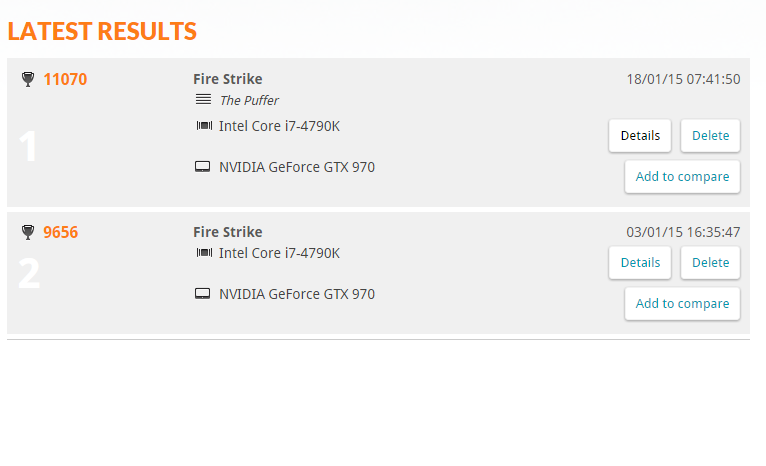
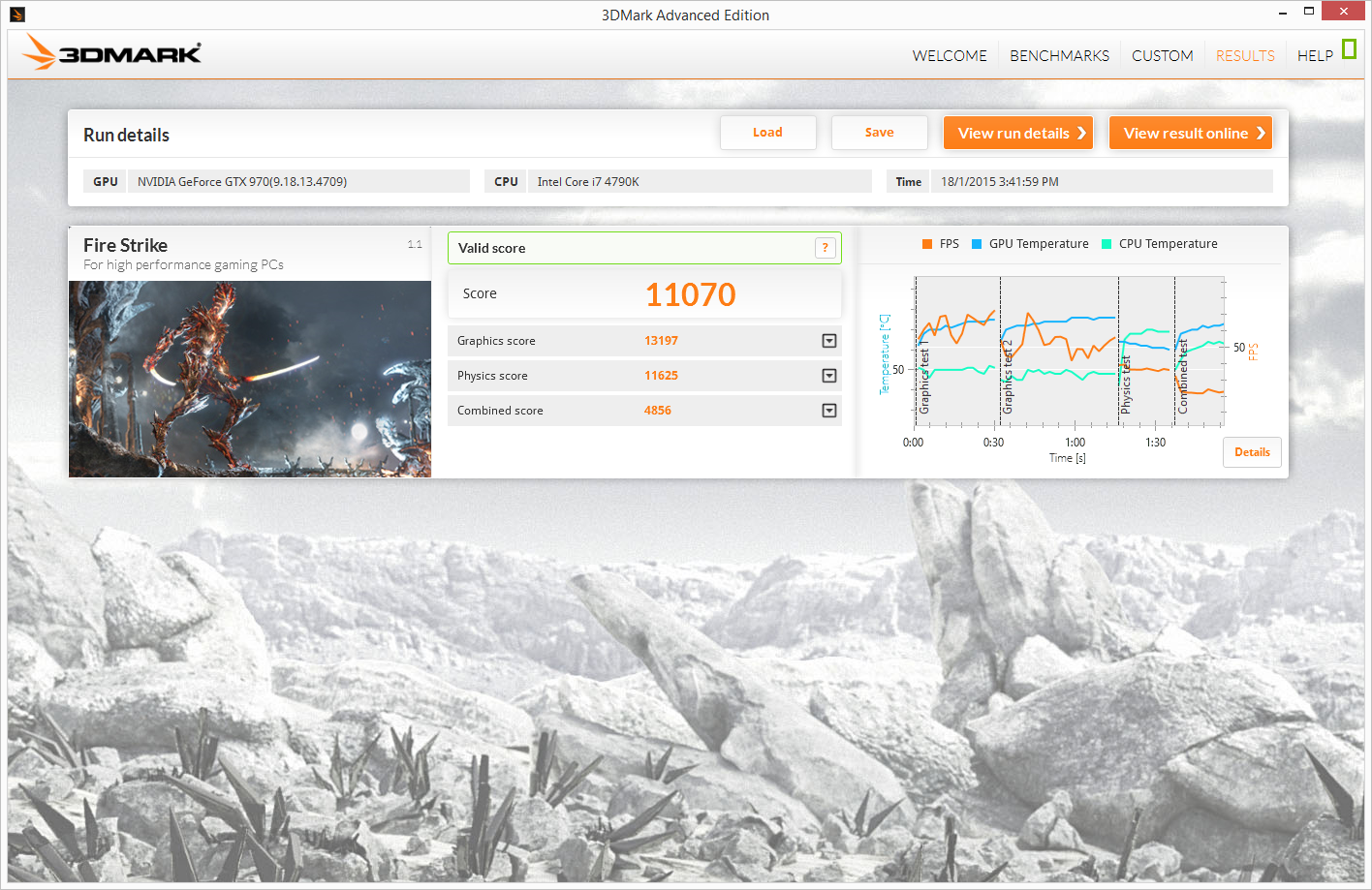
     I ran a 3DMark Fire Strike test at the beginning of the month to see how well my card performed and my rig scored 9656. After overclocking, my rig scores 11070 which is a lot of improvement per say; just goes to show that NVIDIA's Maxwell architecture is a great overclocker. I have some screenshots below and here's the link to the results of pre and post overclocking.

     Last but not least, I ran Unigine Heaven to measure "more realistic" performance (according to reviewers at least). I scored 1538 at 1080P Ultra with extreme tessellation and 8x AA. Remember when you compare scores with others, make sure you are using the same settings as them to avoid unnecessary confusion.


     That about sums up everything I did for performance tuning and benchmarking. I'm still looking for other tweaks that may improve the performance, so if you have any other pointers I should follow, do leave a comment down below and let me know.

Build Log - The Puffer


     Hi guys! This is my first PC build log. I have been wanting to build a rig for quite some time now but never got around to doing it. This time though, the stars aligned and I decided to take the bait. This post will mostly be about my building experience, part selection rationale and other things that are relevant provided I don't go on a tangent.


     First of all, the rationale behind the specifications. I have listed my general specifications on the image above. I went with the Intel I7-4790K for future-proofing as well as to accelerate my occasional video rendering (and for dem overclocking). Multi-core seems to also be a focal point for the next iteration of DirectX 12 so there's that too. To cool a top-of-the-line processor, I have gone with the close-loop AIO cooler, Corsair's H100i instead of a more conventional air cooler to make things more manageable as air coolers tend to get in the way in the build process. For the motherboard, I went with the ASUS Maximus VII Ranger. Reason being that it seems to be pretty user-friendly and the understated red/black colour scheme looks pretty sweet. In the graphics card department I went with the ASUS GTX 970 Strix. Again, the colour scheme is another factor in this choice as well as the included backplate for a more rigid construction. I only got 8GB of RAM due to budget restrictions. For storage, I have a SSD for the lightning fast boot speed and a 7200RPM HDD for general storage. Powering the rig is the Seasonic M12II Evo 750W. I chose the 750W PSU so I can perhaps add another graphics card in the future and the flat black cables goes pretty well with the colour scheme. Enclosing all this is the Corsair Carbide Air 540. I chose the Air 540 for the two-chamber design (hide dem cable clutter) and its focus on air flow to provide breathing room for the graphics card.

before routing cables
     I used guides from LinusTechTips and ASUS PCDIY which can all be found on YouTube. Overall speaking, the building process was much harder than I anticipated. Almost nothing got plugged in correct the first time through, be it the IO shield or RAM DIMMs. I spent about 3 hours trying to get everything in place and another 1 and a half trying to plug in all the cables. I think the reason why the process took so long is because I was unsure how much force should be applied on the different parts. Also, don't get me started on cable management; if I had a smaller case I think it would have went terribly, I feel that the Air 540 is certainly well built for beginners like me.


     The motherboard was also a lifesaver with ASUS's Q-code LED display. It helped me diagnosed a lot of the initial problems like with the "RAM not pushed hard enough" issue. Speaking of not pushing hard enough, my 1TB storage drive was also not pushed deep enough (that's what she said); apparently, there are two clicks when plugging the drive into the Air 540's hot-swap bay which is kind of weird.


     Oh and if you haven't notice already, I named the rig Puffer because the Air 540's cube design reminds me of a blowfish, so I figured it was only appropriate to name it as such. No omega, trinity, poseidon names for me this time round.

FINAL RESULT


     The front cable management is not that great, I know. I will redo it when I feel the need for that, for now, I rather go through my Steam library again. I forgot to take a picture of the cable management at the back but I think you guys will be fine without seeing the mess there.

Flashbacks: My Experience of Hosting a Game Server??!

Banner I would have used if I had my current skill set back then.
     While I was about to fall asleep today, I thought of how I was spending my teen years and why I had only a vague memory of what happened during those years. Suddenly it hit me that when I was 14, I hosted a Maple Story private server on my cheapo desktop computer over a 1mbps internet connection. If you have any knowledge about web hosting and stuff, you know how pathetic the specifications I had to run that server. But that isn't the important part.

     It's probably safe to assume that most people were and still are crazy over the MMO Maple Story. I was one of those kids too. Having played the game since I was 12, over the years I have been going back to the game for short periods of time but soon it got even more boring to me over the years of changes. Another claim I can confidently make is that, every player at one point of the game would think to themselves, "I wished I was a GM (Game Master).
A scene in SAO where Kirito gets admin privileges 
     That amount of control over a game, if you have ever watched Sword Art Online (if you hadn't, please do yourself a favour and go watch it), you would sort of understand the power of a GM. The desire to have this much control over a game had me doing a bunch of research, trying to find out how I would go about to attaining this amount of power. And there I was, stumbling upon a forum thread titled "[Guide] Hosting your own Maple Story server" 14 year old me was ecstatic, this literally meant I had the rights to dictate how the entire game works on my server!
how old school C++ code looked like
     To host the server though, one must go through the difficult *for 14 year old me* set up process. The server files came programmed in Visual C++, where you have to run Visual Studio to compile the files in order for the server to work. That entire line might have sounded like alien language to you, because I assure you, I literally didn't know what I was doing too. After you had the server up and running, you aren't done yet because you need people to be able to connect to it! So you either had to make your IP address a public IP address or use some ghetto LAN emulator so people can connect to you as long as they used the LAN emulator and are connected to your designated network. Me being a lazy ass, opt-ed for the LAN emulator solution as it was the easiest to do.
how old school hamachi looked like. cr: pcmag
     So that's the boring explanation part done. Let's get into the aspect that makes everything in life more interesting; People! Like any sane person's thinking, I need to promote my server over a form of media in order to get people to come play at my server. What better choice than to promote it on YouTube. The saying "Once on the internet, always on the internet" couldn't be more relevant. So here's the video I made for promotional purposes of my private server, MyStory.


     So the video redirected people to my forums which was http://mystoryhome.freeforums.org/. Sadly, it has been abandoned for so many years that the forum is now removed :( All my memories.... But fright not, because the forum is on the internet, we can totally salvage it back. Let me introduce to you, the savior of the internet, WebArchives! You can check out the snapshot of my forum here! You can browse through the captures that slowly show the growth of the forum and in terms the growth of the players on my server.

     In the short time of hosting this private server, I have met some very silly people. If you browsed through the forum archives, you can see how informal and silly the conversations are. Shoutout to Skittles that I have long since lost contact since the closure of MSN IM.

     How has this entire string of events affected me as a person? Hosting this server has exposed me to a lot of the different things that I would gladly say had improved upon. The first time recording and editing a video, the first time I touched the C++, Java and HTML language and of course the first time I interacted with random strangers over the internet, trusting them with my server and so on so forth. You could even say I'm into technology this day due to this incident.

     Today, I wish I still had that tad of recklessness, being able to dive into interesting things without thinking about the next step. Being able to not care about what other people think of me as a person. That's the advantage of being a dumb kid isn't it.... What are some of the stupid things you've done in the past? How has it affected you? Do you have any regret after doing said stupid things? Well for me, I have no regrets as I value the things I learned from hosting a private game server more than the short span of a few months I wasted on it.