.png)

Measuring Your PCs Performance (Guide & Thought Process)

It's been about a month since I built the Puffer, As soon as I got it, I went along my merry way and just gamed through the weeks. Since my hype about my new rig is a tad more worn down now, I decided to stress test my PC to see how it's doing. If you want to read up on the rationale behind this build, read my build log over here.
Before we get started, we have to get our tools ready. Below is the list of tools I have used thus far.

1. AI Suite 3. Adjust voltages and clock speeds without having to go through the hassle of booting into the BIOS. There's also a bunch of other goodies packed into the software. Awesome tool to utilize if you have an ASUS motherboard.
2. Realtemp. Just a simple and reliable temperature monitor.
3. AIDA64. I chose this over Prime95 due to... due to... actually I have no idea why but I went with AIDA64 anyway. Either one of these will work fine.
4. ASUS GPUTweak. One of the many GPU overclocking tools to choose from. I have an ASUS card so I figured I would use this instead of MSI Afterburner.
5. 3DMark. Bought this on the last steam sale. Of course synthetic benchmarks are not an accurate representation of how a rig will perform during real games. However, in this age of "screenshots or it didn't happen", 3DMark standardized benchmarks works better numbers wise.
6. Unigine Heaven Benchmark. I see a lot of reviewers use this to demonstrate their point so I guessed I would try it as well.
Before I went around tweaking stuff, I did a dry run of AIDA64's stress test and to my surprise, my 4790K was throttling due to constantly hitting almost the 100C mark. After some intense Google searches, I figured that I didn't tighten my CPU block enough. After tightening the CPU block, I did another run, the throttling stopped, but the temps were still around 80C give or take 5C.
After some further reading on the interwebs, I learned that my CPU voltage might be the culprit. Opening up AI Suite 3, my motherboard has default to using adaptive voltage which resulted in the CPU using about 0.2v more than the recommended voltage. After dialing down the CPU voltage to 1.130v, I also "underclocked" it to match the stock Intel settings of 3-cores 4.3GHz and 4-cores 4.2GHz instead of ASUS's default all cores 4.4GHz.

With everything ready to rumble, I ran another AIDA64 run for about 30 mins to test for stability and the results has shown to be consistent with other users on the interwebs. At 100% loads, I averaged around 73C which I was pretty satisfied about. I could probably turn down the voltage a few more notches to optimize the heat output but for now I guess it's fine. Oh, and my idle temps are around 34-36C if you were wondering.

Since I have pretty much fixed my initial problem, now it's time to tend to my graphics card. I checked the "overclocking range enhancement" so that I can increase the max GPU voltage and push the core clock even further.

Below are the important numbers, before and after overclocking. You can use the numbers to overclock your Strix 970 but sometimes it just won't work. Something to keep an eye on would be the memory clock as I have seen other people get much better memory clocks than mine so don't worry about it too much. Oh and to determine whether a overclock is stable or not, just run a demanding game and see if any artifacts appear, if no, you are good to go.

I ran a 3DMark Fire Strike test at the beginning of the month to see how well my card performed and my rig scored 9656. After overclocking, my rig scores 11070 which is a lot of improvement per say; just goes to show that NVIDIA's Maxwell architecture is a great overclocker. I have some screenshots below and here's the link to the results of pre and post overclocking.
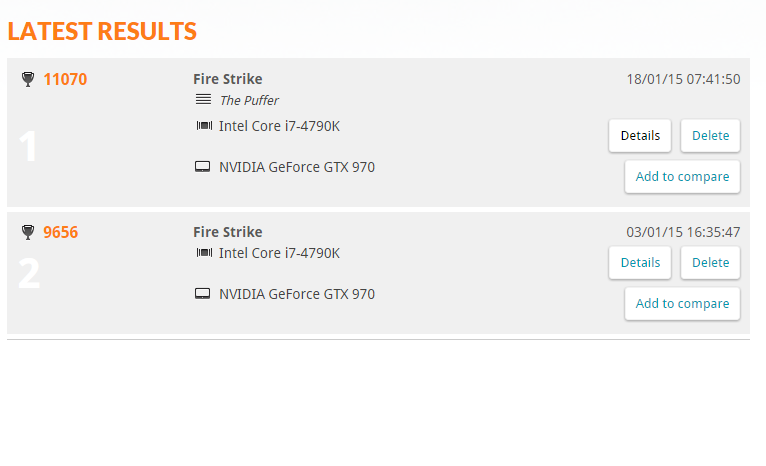
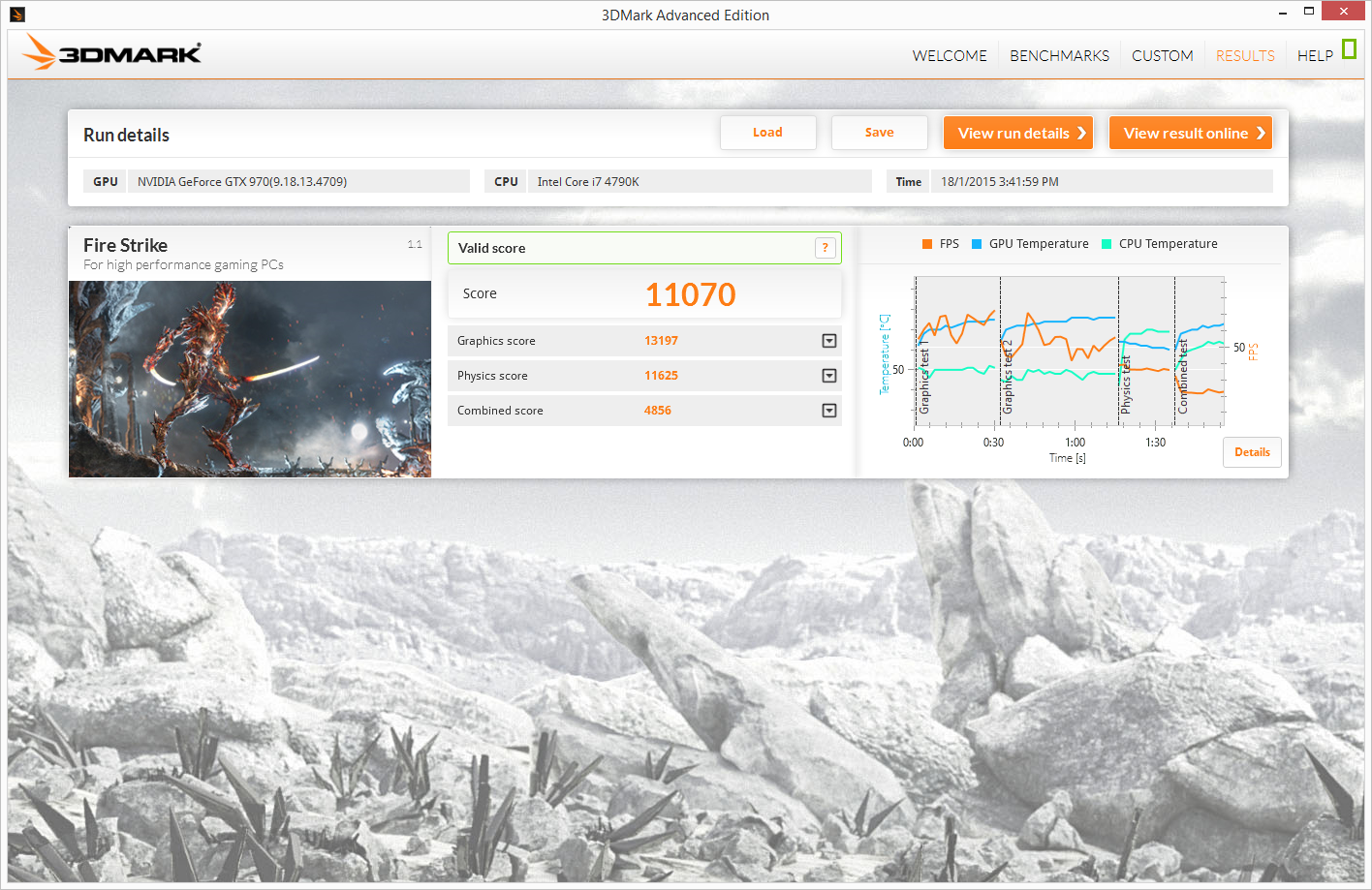
Last but not least, I ran Unigine Heaven to measure "more realistic" performance (according to reviewers at least). I scored 1538 at 1080P Ultra with extreme tessellation and 8x AA. Remember when you compare scores with others, make sure you are using the same settings as them to avoid unnecessary confusion.

That about sums up everything I did for performance tuning and benchmarking. I'm still looking for other tweaks that may improve the performance, so if you have any other pointers I should follow, do leave a comment down below and let me know.


![[Updated 14/2/2015]How to root your LG G Pro2 (D838) 16/32GB](https://blogger.googleusercontent.com/img/b/R29vZ2xl/AVvXsEjkY8Y7i9l2uFPJopjlnr2KMnfJi0aklEC2b-GYGiPfLMxMbfNZ5YUj2keosvTlxF12NMOuNarLVif_wAUnfbwpPGRyFNU2eo8b6tsEz2u3DDLd5G4wvxD318gViu78Uxk6y0a6M6t9FRcc/s72-c/root+guide.jpg)
![How to root your OPPO Find 7 (X9076) & Find 7a (X9006) Stock/Custom Recovery [Updated for ColorOS 2.0]](https://blogger.googleusercontent.com/img/b/R29vZ2xl/AVvXsEgCiB_-MGvCpPXX28qC4nLbxmdHrFKSqgCPOhx8I8eEC180X3VC_o9YMaLzb80SNqq1aKDarK6y1daaLF6140d60XjT9ZcOd1_PsgQJvRYxXknJW-KNhnfJq27gUvYWa7M2PhUJy-pLPU_g/s72-c/root+guide.jpg)


