Showing posts with label logitech. Show all posts

Logitech G502 Proteus Core Tunable Gaming Mouse Review


     Back in May this year, Logitech officially launched the G502 Proteus Core in Malaysia. While I did request a review sample back then, it is only till last month did I finally get my hands on one due to popular demand (or because reviewers like me tend to hold on to stuff longer than we should). I remember first seeing this mouse back in April where it made it onto my "Best of PAX East" list and was pretty excited behind the idea of this particular mouse. Without further ado, let's get started with the review of the G502 gaming mouse.

Logitech Unveils New G402 Gaming Mouse, Dubbed "Hyperion Fury"


KUALA LUMPUR — July 31, 2014 — Logitech, a leading innovator of gaming peripherals, today introduced the fastest gaming mouse ever made, the Logitech® G402 Hyperion Fury™ Ultra-Fast FPS Gaming Mouse. The Hyperion Fury features Logitech’s exclusive Fusion Engine™ sensor technology that can reliably track over 500 inches per second (IPS) and Logitech’s exclusive Delta Zero™ sensor technology for unrivaled accuracy.

Father's Days Gift Ideas for 2014


     We are halfway through the year already and one of the most significant events happening this month would be Father's Day! To celebrate the occasion, one would often buy a tie or a wallet alongside a cake for the man of the house. With KENYSL.com being a technology blog, of course, I won't be recommending the usual clothing accessories, instead, I will be recommending some awesome technology related gadgets that dad will probably find useful.

Logitech G700s Wireless Gaming Mouse Review


     If you don't already know, in one of my previous reviews, the G602 became one of my favourite wireless mice of all time. Logitech has always been the one to trust when it comes to wireless mice; especially when precision is required, I have always placed my money on Logitech's wireless gaming mice. Today, I have with me the big brother of the Logitech's line of gaming mice, the G700s. Without further ado, let's see what the G700s has to offer.

Logitech G19s LCD Gaming Keyboard Review


     I remember when I went to my first ever PC Fair, poor secondary school student me bought my first ever gaming peripheral; the G110, a gaming keyboard made by none other than Logitech. It's been almost 4 years since that happened and it's fortunate to say that my G110 is still working perfectly fine as one of my family member had since then snatched it from me. Today I will be reviewing the G19s LCD Gaming Keyboard, sitting atop the price range bracket in the keyboard category, let's see what the G19s has to offer.

WHAT'S IN THE BOX


The keyboard itself, a wrist rest, an AC power adapter and some user documentation

TECH SPECS
  • Dimensions (L x W x H): 495mm x 267mm x 51mm
  • Weight: 2204 grams
  • Display: Colour 320-by-240 pixel display
REVIEW

     Taking the G19s out of its box, I notice the packaging is fairly simple with the keyboard being the first thing you see right from the get go. I would have like to seen maybe a plastic shroud to protect the keyboard especially since it has a LCD screen right on top of it. After getting the keyboard out, there's a cardboard partition that holds the AC adapter, the wrist rest and also the user documentation.


     Putting the packaging aside, let's focus on the star of the show. Checking out the keyboard in its entirety, if you have used any of Logitech's previous gaming keyboards, the G19s doesn't deter too much from its original aesthetics. You have your 12 G-keys on the left side of the keyboard and on top of that you have the easy profile switch buttons that allow you to switch between three profiles that you have created and customized via the Logitech Gaming Software. I will elaborate more on the software later on in the review. Not forgetting also the macro recording button which allows users to record macros on the fly and review it later in the software. Beside that is the toggle to enable 'gaming' mode that will disable keys like the Windows key. Right above the numpad, we see the classic media control setup that has been a staple of Logitech gaming keyboards. What I like about this particular setup is that Logitech actually made the volume control into a scroll wheel, which makes controlling the volume a much more intuitive action compared to the conventional "press modifier key + function key" volume adjustment method.


     Right behind the media control keys, we see 2 USB ports which are also powered by the AC adapter, making them both active USB ports which allow users to plug in devices like smartphones to charge alongside the keyboard when they are using their PC. I find these 2 USB ports especially useful when you have a wireless mouse like the Logitech G700s (review coming up very soon) which has Logitech's slim receiver and a charging cable so you can easily switch between wireless and wired mode.


     Flipping the keyboard around, we get to see the cable management lanes. Cable management lanes are always handy to have. We also get to see the keyboard feet as well as how the detachable wrist rest works. In my opinion, the keyboard lacks grip as can be seen from the lack of rubber grips. While the chances of you pushing the keyboard while you are gaming is pretty low, I would have like to have seen more grip on the keyboard.


     The wrist rest on the other hand, is able to attach to the keyboard firmly without much hassle. The wrist rest attaches so firmly to the keyboard to the point where removing it becomes a really difficult task. Do keep in mind though, in normal usage conditions one wouldn't constantly remove the wrist rest. Anyhow, a detachable wrist rest is always a plus in my book.


     Now let's shift our focus to the star of the show and pretty much what makes most of the price tag, the LCD screen. The LCD screen is a colour display that bolsters a 4:3 screen aspect ratio and a resolution of 320x240. While that might look like a little low on the pixel count especially when considering nowadays the marketing trend is to slap a "1080P" or "4K" sticker on a product, the resolution on the G19s' LCD is perfectly enough for its usage. Right beside the screen, one will find the controls that are used to navigate the interface on the LCD.


     So what exactly can you do with the G19s' LCD display? A quick run-down inside the Logitech Gaming Software will give you guys a pretty good idea. Users can enable or disable certain applets and also control how bright they want the display to be.


     Here are some in real life shots to demonstrate the G19s' applets right out of the box.

 The RSS reader applet
 The G-Profile selector
 Countdown and stopwatch applet
Picture viewer applet
Video player applet

     There are also some 3rd party plugins by developers like LCDHost or FalNET Display Manager that allow for more functions like a much more throughout system information display or user created layouts for certain applets. One particular applet that I find interesting is the ColorFactory applet found inside FalNET Display Manager that lets the keyboard go all out on illumination settings like what I have linked down below.


     Other than what I've written above, some games also have applet support for the LCD screens. You can find the full list here.

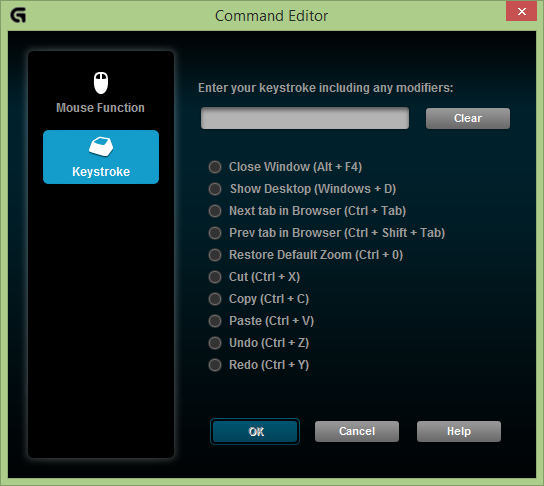
     Earlier in the review, I have already mentioned about Logitech Gaming Software, so here's the part where I explain what Logitech Gaming Software is and what is it designed to do. For starters, the Logitech Gaming Software allows users to customize what they want the 12 G-keys to do. Users can bind macros, single or multiple keystrokes, mouse functions if you have a Logitech gaming mouse plugged in and even shortcuts to other programs on the keyboard. I would have liked to have the ability to rebind every key on the keyboard instead of just the 12 G-keys as it is an industry standard already even for cheaper keyboards by other manufacturers. What I like about LGS though is that you can have unlimited profiles for different games on my PC; however this perk does not extend to when you are using the on-board memory featured on the G19s and you are limited to 6 profiles.These profiles also can also have a trigger associated to a certain program.


     Users can also customize what colour they want the keyboard to be lit in. Users can either choose their favourite colour using the colour wheel or by punching in RGB values (particularly useful so I can use the exact cyan blue I use in my logo.) Users can also opt to use some pre-determined colours which pretty much cover every colour on the rainbow. That pretty much covers everything about the software.


     Before I go on to the conclusion, there is something I would like to mention. If you don't plug in the AC adapter and use the keyboard by using solely the USB connection, understandably, the LCD will not be activated. However, the backlight will not function as well. Just something you might want to take note if you are planning to buy the keyboard.

CONCLUSION

     The Logitech G19s is a well-built membrane keyboard that does not alter the original keyboard layout other than extending it out a bit on the left to implement the G-keys. However, a big bombshell to this keyboard would be its retail price which is a whopping amount of MYR 699.00. While I understand that most the cost comes from probably the LCD screen, some parts of the keyboard just doesn't cut it for the price tag. For a keyboard of that price, I would have like to have seen a much more advanced lighting system like lighting zones as opposed to one colour across the board. I would also like to have seen per-key programming as opposed to just the 12 G-keys. Removing the only speciality of the keyboard - the LCD screen, you will be left with the already phased out G110 which if I remember correctly, you could get at about MYR 210.00 a few years ago. So the question you would have to pose to yourself would be: Is the LCD screen worth the additional cost? In my honest opinion, I just can't find myself owning a keyboard like this.

Logitech Showcases The G502 Proteus Core Alongside Other Lifestyle Products


KUALA LUMPUR, May 14, 2014 – Logitech tosses in a flair of style and a dash of colours into the lifestyle of their users with the launch of their new lineup of products. The latest additions include the Logitech M235 FY15 Colour Collection, Logitech M545, Logitech M165, all of which are wireless mice; unveiled also are the Logitech MK240 wireless mouse and keyboard combo, Logitech Z443 speakers and the star of the show for KENYSL.com, the Logitech G502 Proteus Core Tunable Gaming Mouse.


     First unveiled during PAX East 2014, the Logitech G502 was designed with the notion that every gamer is unique and that their gear should be adjustable to suit their own personal uniqueness. This can be seen from the new weight system being introduced in the G502 that provides gamers more control over the balance of the entire mouse with five 3.6g weights. Other than that, the mouse also features a surface tuning calibration function that is new to the Logitech line of gaming mice. If you read my 'Best of PAX East 2014' post, you would also be aware that the G502's sensor is currently the top of the line sensor that can perform up to 12000 DPI. One thing that the event seem to gloss over was the G-Shift function that allows the 11 programmable keys step up to 21 programmable keys. Even though this function was already seen on the G600 before, I still think it's a pretty neat function to be re-introduced and I hope that Logitech will allow this function to extend to more within their gaming line and not only a particular few mice.


     Another interesting thing that was unveiled at the event was the Logitech Bluetooth Audio Adapter. I think a lot of you already have a nice audio setup as well as a large music library inside your smartphone or other devices like a tablet of some sort. This particular add-on will work on any sort of speakers that support 2.1 stereo output. By the simple act of connecting your speakers via 3.5mm jacks to the add-on, your speakers will now support Bluetooth connectivity and play your music library wirelessly.

     Logitech also revealed it's new updated pico-receiver, which is an upgrade from the currently circulating nano-receiver. The pico-receiver now only measures in at 3mm which again, makes it the smallest receiver in the market. For the first time ever, I'm inclined to agree that the quote 'plug in and forget' Logitech uses. The pico-receiver will be included with the new M545 wireless mouse that will be launching later in the year.

     Pricing and availability wise, available at the coming weeks are the G502 @ MYR 239, the M235 @ MYR 59, the Z443 @ MYR 299 and also the Bluetooth Audio Adapater @ MYR 129. Other than that, the M545, the M165 and the MK240 are to be made available within the second half of the year.

     What do you think about Logitech's upcoming products? Personally I'm excited for the G502 but unfortunately there is a very long waiting list to get that particular review sample so it would be some time before I can do a full review on it. On the bright side though, I have a review of the G19s Gaming Keyboard coming up very soon on the blog so stay tuned for that.

Ken's Best of PAX East 2014


     So PAX East 2014 happened last week at Boston, New York. If you don't already know, PAX East is an event all about gaming started by Penny Arcade. Going strong for 10 years now, the event has slowly expanded from featuring games alone to also highlight some hardware vendors that are closely related to the gaming culture. As usual, I will list down some of the best reveals/announcements/releases from the event, in no particular order.

Logitech G502 Proteus Core

     It seems that Logitech is so fond of PAX that after revealing the G602 (which I have a review on) at PAX last year, they decided to unveil the G502 Proteus Core they have been teasing on Twitter for the past few weeks. If you are wondering why is there an extra codename behind the mice's model name, Logitech explains that they are trying to move away from the traditional naming scheme. The most interesting part of the G502 is of course the new sensor that it utilizes. The optical sensor bolsters up to 12,000 DPI, which is the first time anyone has seen an optical sensor capable of such high DPI. Logitech claims that the sensor is the "most accurate" among all sensors but that remains to be seen. Other than that, the Proteus Core also features a revamped adjustable weight system which does not change the centre of gravity of the mouse no matter how much weight is put into it. Again, this is a very interesting mouse and hopefully I will be able to get my hands on one soon.

There Came an Echo
           
     Are you tired of the traditional RTS game that requires relentless focus throughout the entire session and impeccable macro + micro management skills? Fright not; There Came an Echo is a very interesting RTS game that doesn't utilize the traditional control mechanics, instead, units are controlled by using voice commands. While this is not the first time it's been done *cough* EndWar *cough*, this game takes it up a level by allowing gamers to customize the voice commands; instead of "Fire in the hole" for throwing a grenade, perhaps I will change it to "HOT POTATO!". The possibilities are endless. The game also takes a few pages from the XCOM games so fans of that franchise might love this game as well.

Star Citizen
     If you haven't heard about Chris Robert's Star Citizen, you are missing out on a lot. Said by many PC gamers as the game that will push PC hardware to its limits and perhaps reintroduce the same effect as the first Crysis had on the scene. Star Citizen, while having release its hangar module quite some time ago, is in this list because it recently unveiled its dogfighting module which is pretty darn amazing. I wish I were there to experience it myself, but until then, we have loads of videos about it so that will have to do for now.

Transistor
     From the creators of Bastion, one of my favourite indie game of all time, comes Transistor. While retaining the unique narration techniques in Bastion that I absolutely love, Transistor introduces some new mechanics that seem to add another level of depth to the game. It will be out very soon and I can't wait to play it!

Honourable mentions
  • Galak-Z
  • Aztez
  • Invisible Inc.
     Those were my favourites from the event, how about you? What are you most excited for? 

Logitech G602 Wireless Gaming Mouse Review - Does Science Really Win?


     First debuted at PAX 2013, the G602 wireless gaming mouse is fundamentally designed to solve the problems of what people might have with wireless mice, worrying that it might run out of battery midway through a gaming session or there will be too much input delay resulting in lag and all gamers know that lag is nothing you want to deal with especially playing online games. So without further a due, here is my review of the Logitech G602 wireless gaming mouse.

WHAT'S IN THE BOX, KEN?
The box and the mouse itself.
The mouse (of course), 2 AA Duracell batteries, a non-Unifying wireless receiver, an extender for the receiver and a quick start guide.

TECH SPECS
Tracking
Resolution: 250 – 2,500 dpi
Max. acceleration: >20G
Max. speed: up to  2 meters/second (80ips)
Responsiveness
USB data format: 16 bits/axis
USB report rate: Up to 500 reports/second
Glide
Dynamic coefficient of friction - Mu (k): .09
Static coefficient of friction - Mu (s): .14
Durability
Buttons (Left / Right): 20 million clicks
Feet: 250 kilometers
Battery Life and Wireless
Performance mode: up to 250 hours
Endurance mode: up to 1440 hours
Wireless range: up to 3 meters

DESIGN

The mouse in its entirety.

    
 If you have not already seen it, the G602 sports a kinda weird shape if you ask me. Unlike normal mice that usually has a kind of a symmetrical bottle shaped body, the G602 is more like an oval shape. At first sight you would think that this mouse was intended for left handed usage but it is actually for right handed usage. Lefties can still use this mouse but I don't think they can utilize the extra buttons on the left side of the mouse (unless you have godly pinky strength of course).
The side buttons.

      Talking about extra buttons, you have a 2x3 layout for the extra buttons on the side. I was sceptical about this layout at first but it quickly changed after the first few hours of using the mouse. Fortunately enough, it is easy to remember which button you are pressing with your muscle memory. You also have 2 small buttons at the corner of your left mouse click which are the default buttons for DPI switching.


The LED indicator (sorry for the blur, it's hard to take a shot before it goes away)

     And if you were looking for cool LEDs, unfortunate for you because they are no flashy LEDs on the mouse other than the a tiny indicator below the mouse wheel that lights up blue/green for a moment when you switch between performance mode and endurance mode. This indicator also shows you the battery level where you can press the G6 button as default to check.

     Comfortability wise, the mouse has nice contrasting textures like the smooth touch rubber where your palm would be on and the roughly textured sides so you can maintain your grip without much effort. The aforementioned weird shape is also very ergonomic for the typical right-handed mouse user. 

How the bottom looks like.

     Let's shift the focus to what's down and under the mouse. One thing you could immediately see is the abundant amount of mouse feet padding. Other than that, the mouse feet allow the G602 to be used on almost any surface without the need of a mouse mat. Perfect for people like me who literally use my notebook anywhere on a plethora of different surfaces.

     So what is this Delta Zero sensor that Logitech deploys in the G602? Well, there hasn't been any official word on exactly what sensor it is. All I could say is, the sensor does get the job done. The mouse can go up to a maximum of 2500dpi, which is more than enough for me. 

2 AA batteries and a slot for you to keep the receiver.

     What's essential to a wireless mouse? The battery of course. Included in the package is 2 AA batteries which will power the mouse for up to 250 hours. Compared to using a proprietary rechargeable battery, this means you can easily find a new set of batteries to replace if it eventually goes kapoof. Oh and did I mention you are able to use the mouse even with only one AA battery? So there's that.  

The mouse and the receiver.

    So how about the receiver? As you might have already know, it is specified that this mice uses a non-unifying receiver. Why? To prevent any interference from other Logitech products. The unique receiver also allows for the mouse to have no input lag, claims Logitech.

FUNCTIONALITY

Logitech's software allowing for further customization.

     As I have said before, a lot of the functionality that gaming peripherals have all come from their respective software, Logitech's being the Logitech Gaming Software. There are two different software modes you can redefine for, the "On-Board Memory" mode and "Automatic Game Detection" mode.


     In "On-Board Memory" mode, you get to remap normal keystrokes like Ctrl+C onto the mouse and have the mouse save said keystroke in it's on-board memory. This allows you to plug it into other computers which don't have the Logitech Gaming Software installed but still have custom keys mapped onto the mouse. Pretty nifty if you ask me.


     Next comes the "Automatic Game Detection" mode, which ironically does what it's named after. Other than having the special commands specific to games, this mode also helps you to switch between different profiles when an .exe is detected. You can easily set up new profiles for new games and even productivity software like PowerPoint and what not. Of course, don't forget about the macro recording function that almost every other gaming peripheral has. 

CONCLUSION

     My personal experience using this mouse for more than 2 months is that the G602 is one of the best wireless mice I have ever used. I really like this mouse for it's portability without compromising on the functionality. The battery has yet to die on me even though I have been using it extensively. The Logitech G602 is basically everything you are looking for in a gaming mouse; precision, functionality and performance all while being wireless. I whole heartedly recommend this mouse for anyone that looks for the above criteria. The Logitech G602 retails for RM269.00 and is readily available at all major retailers. With all that considered, the G602 is awarded the Editor's Choice award!