Showing posts with label article. Show all posts

Taking Windows 10 Technical Preview Out For a Spin


     The Windows 10 Technical Preview has been available to public for quite some time now. While I did try it out using VMs during the earlier builds, it wasn't until when Microsoft enabled Cortana in Build 9926 and announced the free upgrade to Windows 10 for both Windows 7 and Windows 8.1 users; that I installed it into a true partition. This post will be about my experience using the Technical Preview as well as some pointers for you all wanting to be prepared for the free upgrade.


     Before I get started, if you are interested in getting into the action yourself, installing the Technical Preview is easier than ever; just get the Windows 7 USB/DVD Tool (link) and the Technical Preview ISO (link). The procedure is pretty self explanatory and if you are still confused, I am afraid that you are not prepared (sick reference, bro). Also, this post is written in the perspective of someone who has switched to Windows 8 from the get-go and didn't find it as frustrating as the general consensus has it be.

     Installing the Technical Preview was as easy as any other OS installation and if I recall correctly, didn't take as long as my Windows 8.1 install, but not by much though. If you are coming from Windows 7 or any previous OSs, I recommend that you do not connect your PC to the internet to ensure that the initial setup process. For Windows 8.1 users, go ahead and sign in using your Microsoft account so that things like IE settings and wallpapers will get synced to your new Windows 10 ecosystem.


     From the get-go, the most noticeable difference one will see would be the addition of a search bar on the task bar. This search bar is what Cortana is. Users can either type their search queries in the search box or use voice activation. To be honest, it's faster and way more reliable to just open up the browser of your choice and type what you want to search for. As for searching on local disk, I didn't notice any significant differences in terms of speed. Talking of local searching, if you didn't like how local searching worked for Windows 8.1, don't hold your breath for Windows 10. Typing 'control' in the search bar, the first result instead of being the comprehensive 'Control Panel', the OS gives you the inconsistent 'PC Settings' instead. While I am used to this (yup, Win8 behaves the same way), I still find it a mild annoyance especially for new users coming from Win7.


     Speaking of the 'PC Settings' interface, the inconsistencies doesn't stop at just being confused as a control panel, in fact, it is just plain dumb. One would assume that clicking into the 'Personalisation' sub-section would give users access to all customisation options including things like changing wallpapers, colour schemes, and all the other doo-dad; but nope, we have that option in another menu instead. Maybe if they just changed the tool-tip according to what the menu actually does. It wouldn't create these issues. Of course, that is not the only example of redundant menus, I could go on all day long about the 'PC settings' menu, but the post has to go on.

     Oh, and if you didn't notice already, the start menu is back! Now with Metro a.k.a the Start Screen integrated into it. If you are one of those rare few that like the Start Screen, you can still click the full screen button found on the right top corner to bring back the Start Screen. Apparently, I read that one could re-size the start menu to be taller, but I can't for the life of me re-size it. No matter, the quirks of being a Technical Preview I guess.

     From the screenshot above, you can also see that Microsoft went ahead and changed how the taskbar behaves in relation to active and inactive windows. Have a better look at it here.


     On the left, you will see that the file explorer icon on the taskbar only has a little grey-ish line due to it being inactive and the 'PC Settings' icon being grey-filled due to it being the currently active window. I'm not too keen about this change but perhaps people would like the minimalistic (?) approach.


     On topic of active and inactive windows, Microsoft has also brought a very nice feature from OSX into Windows 10: the workspace/task manager/whatever it's called. Now, you can have multiple workspaces and switch between them seamlessly using the task manager button beside the search bar or using the "Windows Key + Tab" shortcut key. This is great news for people like me who tend to have too many windows open while multi-tasking, now I can properly manage work from pleasure! (curse you Steam and Reddit). This is pretty much my favourite feature to come out of this Technical Preview.


     Onto the system apps, Microsoft has pretty much changed how 'Modern' apps behave. Now, users can use modern apps like any other desktop app, with the ability to run it in a window, or fullscreen. I think this is one of the most requested feature from users of Windows 8/8.1. However, for whatever reason, the OS still defaults to the redundant file openers like Photos, Videos and Music (apps designed by Microsoft with modern-esque accents). While it only takes one click to change it back to our trusty old Windows Photo Viewer, it still presents itself as a mild annoyance.


     On the other hand, Windows 10 also comes packaged with a technical preview for Internet Explorer. I don't have much to report about that. I think it's just a way for web developers to determine their websites are displaying correctly in IE. There's even a button for users to report to the IE team if they see a website not being properly displayed in IE.

     There are a ton of minor adjustments made to Windows 10 compared to Windows 8. I could probably go on and on if I had to describe everything in this post, but nobody is going to read that. So as a closing note, is Windows 10 usable? Pretty much yes. For those who are on the bandwagon that Windows 8 is the worst thing to ever happen to Windows after Vista, perhaps it is not for you because I find Windows 10 a slightly modified version of Windows 8, instead of an improved version of Windows 7. If you have any other questions about Windows 10 before making the jump, feel free to leave them in the comments down below. Until then, see you in the next post (if I can figure out what to write).

Ken's Best Of CES 2015


     This year's CES has come to an end and here I am again, summing up what I find interesting throughout the annual event. These products/concepts are some of my personal favourites that were revealed during the event. While I don't cover everything that's happened during the event, I find that TechCrunch and The Verge provide some of the best coverage on this year's event so check out their coverage if you are keen on learning about everything CES.


ASUS ROG Swift PG27AQ 27-inch 4K G-Sync Monitor (link)
     ASUS's ROG Swift PG278Q swept everyone off their feet when it was first released as it was the first 1440p monitor to have G-Sync support. G-Sync is NVIDIA's propitiatory standard which allows monitors to refresh only when the display card outputs a new frame. To learn more about G-Sync, you can visit NVIDIA's page here. In short, it provides a smoother and much more enjoyable gaming experience for consumers. This time around, ASUS has addressed one of the major issues that reviewers/users have pointed out, the TN panel. The PG27AQ features a 4K IPS panel which allows for better colour reproduction and overall better image. Of course, the only drawback is the downgrade to 60Hz but as of now, only a handful of people can drive 4K above 60fps so that's fine in my eyes. Overall, a good upgrade to an already amazing monitor.
pictured: LG 34UM67
AMD FreeSync Monitors (link)
     AMD is off to a good start with its FreeSync technology, a direct competitor to NVIDIA's G-Sync, with the introduction of 9 FreeSync supported monitors, which if I recall correctly. is already more than the number of G-Sync supported monitors despite its earlier launch. Competition is always good for consumers as it keeps competing companies on the edge, always trying to top each other. My favourite among the 9 monitors would be the LG ultrawide monitors. I always wanted a 21:9 aspect ratio monitor but could never find one here in good ole Malaysia; the only LG products I can seemingly find are washing machines and refrigerators. Oh well, such is the vain of living in a developing(?) country.


NVIDIA Tegra X1 ft. Drive CX and Drive PX (link 1 link 2)
     I swear this is the last item on the list that has to do with graphics chip manufacturers. Remember the Tegra K1? Meet its little sister, codename Erista (Tegra X1). The Tegra X1 continues to improve on the K1's already very powerful display and processing capabilities. Utilizing NVIDIA's latest Maxwell architecture, the X1 effectively reduces power consumption without compromising its performance. While that doesn't sound too exciting, wait till you hear this: self-driving cars that can learn. Yes, utilizing the Tegra X1's amazing processing capabilities, the Drive PX is able to drive itself around the a course with some learning; which goes to show how powerful its real time processing is. Drive CX on the other hand, is a digital cockpit interface for vehicles, which looks pretty impressive on its own. I will attach a video below from the NVIDIA press conference.


ASUS ZenFone 2 (link)
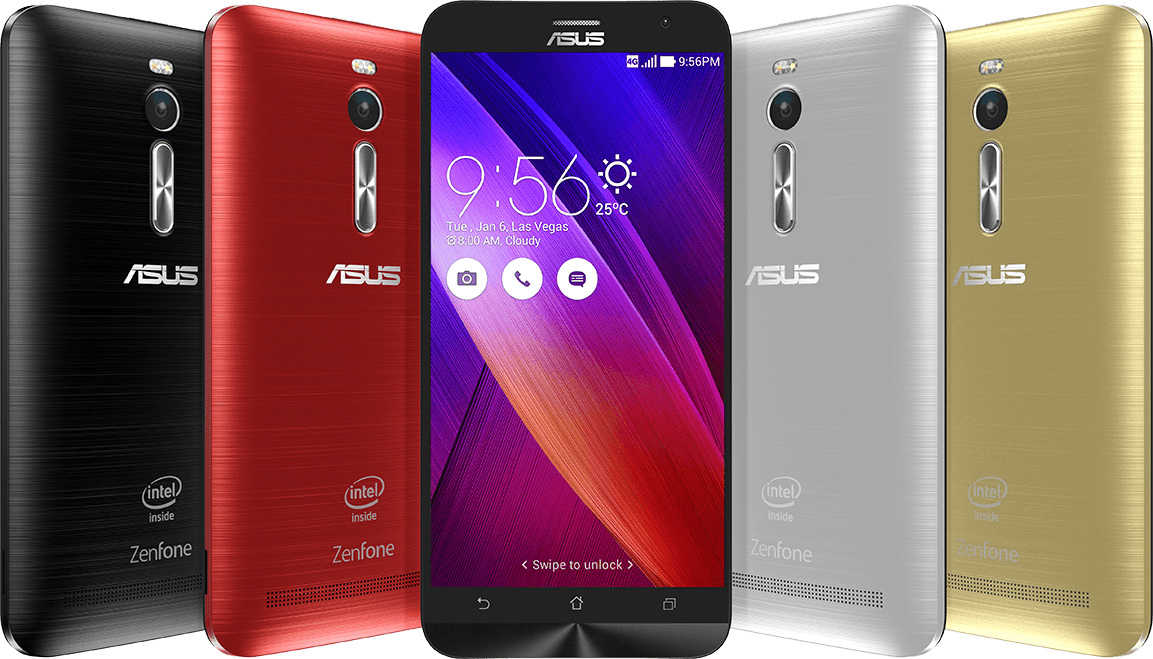
     ASUS is on the list again, this time for the ZenFone 2. The reason the ZenFone 2 is on this list is for its amazing value; the base 16GB/2GB model is priced at a mere $199. Also, an interesting thing on the spec sheet is the Intel Z3580 processor; I want to see if Intel could break the monopoly that Qualcomm has over the industry on flagship phones. Still not a big fan of the on-screen buttons though.


Razer Turret (link)
     What is a CES list without Razer in it, am I right? While Razer did reveal the Forge TV Android gaming console, what interests me more is the implementation of mouse & keyboard for this particular setup. While this combo is not a entirely new concept (ROCCAT Sova), it's nice to see a much more compact and subjectively more stylish implementation. The mousepad is also magnetized to ensure that the mouse doesn't just fall off, which is a nice touch if I might say.

Honorable Mentions


ALCATEL ONETOUCH's Watch (link)
     This would have been one of the top things on my list, if only it ran on Android Wear. A $150 Android Wear running circular watch that looks nice? Sign me up for that.


MSI GS30 (link)
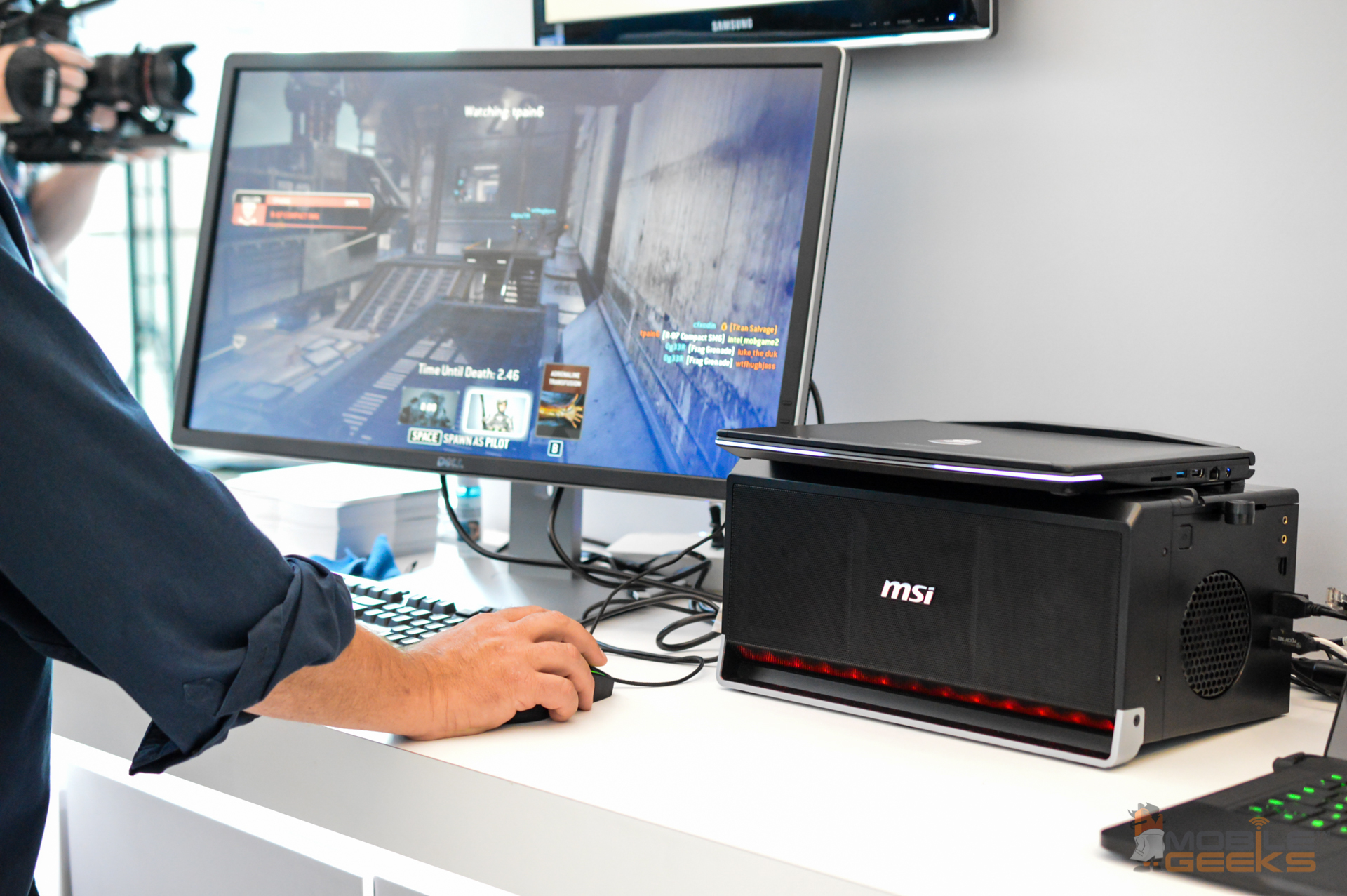
     If you didn't know, I am not a big fan of having to sync multiple devices especially when it comes to personal computers which contain some of my very important work. The GS30 is a lightweight laptop on-the-go and a graphics powerhouse when you need with a simple docking mechanism. Now MSI, make it cheaper and I will bite. With all that said, I really want this concept to take off so I don't have to panic when one of my documents are synced with the cloud.

Welcoming 2015 With A Whole New Layout!


     Happy new year guys! If you haven't notice already, I've done some changes to the blog layout as I felt the previous layout has already devolved into something that I no longer am able to maintain. While a new layout change had been put on the backburner for a long time now, I have found the perfect excuse to finish it today: it's the dawn of a new year!

     Wow, it has been a pretty amazing year for the site considering my half-hearted effort to grow it into something bigger. While I have no idea what the new year has installed for me, I am pretty excited nontheless as new year = new tech! Oh, what advancements will we see for the next year in the consumer electronics, I guess we will have to wait for CES! Anyway, I have uploaded some gameplay footage onto my YouTube channel. They are mostly just random moments I capture while I game so do not set your expectations too high, yes.

     Again, have a happy new year!

     EDIT: I notice that numbered/bullet lists aren't working properly, I will try to fix it but I guess until then guide readers will have to suffer a little eye-sore so bear with me in the meantime.

Year-In-Review 2014 - Status Update #3


     Again, it is that time of the year to recap everything that has happened so far into the year so I that I can do some self-reflection and decide what to put on the plate next. I tried to write this in a chronological manner but unfortunately when the 'kick' hits, I have to disregard any sort of content organization :P.

     Back in January, I acquired this domain to try and make this hobby into something of a serious affair. Back then, I was thinking of all the ad dollars I could make if I can turn this into a successful blog. Well looking at the blog now, I don't think I'm making a lot of progress into that goal, which may or may not be a good thing. After Google denied me from AdSense due to insufficient content, I tried other services like Chitika which frankly I will say makes the blog look even worse than it already was.

     After acquiring the domain, things seem to be going along a tad faster. Companies started to contact me to have reviews written about their products. Of course, all these reviews remain unbiased till this date because I still believe that being the niche outlet that provides true insights will play to my advantage in the long-run. I would like to take this chance to say thanks the following people/firms who gave me a chance to do what I like to do: Andrik from i-Rocks, Samuel from Armaggeddon/SonicGear, Lik Wei from OPPO, J1 Consulting representing ALCATEL, Ivan from PLAY Interactive (ROCCAT), Jeffrey from Rantau PR (Logitech), and any of those whom I forgot to mention. Thank you so much, this year of review writing has really improved my writing skills and also gave me a better insight as to what kind of person I am. I would also like to thank all my friends who have assisted me or inspired me to do better. I am not going to name any names here (to avoid internal affairs lol) but you all have impacted me in some shape or form regardless. I would also like to thank my parents for being supportive of my writing despite being skeptical when I was just starting.

     To follow suit on gratitude, I want to apologize to a few people for prioritizing the blog and my studies over their causes. I apologize to the C2AGE committee and HELPAKid committee for being non-committal to their cause. I apologize also to those who I have disappointed regardless of whether or not I have acknowledged their disappointment.

     This year in gaming, I would say that it's been pretty boring. Even when developers come up with new IPs, it seems that most of them still use the same bread and butter mechanics with the addition of a little to no innovative mechanics. The games I really liked this year are probably HearthStone, Watch_Dogs and Shadow of Mordor with SoM being my favorite game so far. I also seem to like Dota 2 lesser and lesser now which is similar to what I experienced with MapleStory.

     Now I'm trying to recall what was memorable this year, which frankly, I have a bit of a difficulty trying to remember. It can come to a conclusion that this year was a bland year or everything in this year is so awesome that I am desensitize to it already. Welp, I can't really think of any memorable stuff this year so I will move along to the self-reflection part.

     This year round, I watched a TED Talk where the speaker talked about an interesting idea and I quote "Fake it till you make it." While that sentence may sound terrible in some contexts, I interpreted it in my own way, which is to believe in yourself. I think the quote has helped me overcome some of the doubts in my head and continues to be the fuel behind everything I do.

     Coming back to the website, I am planning to move the site onto WordPress. Blogger has disappointed me at so many points of time and I am pretty much ready to move away from it. So much so, that I already started building a test site to see if WordPress can do everything I need it to do. Here's a sneak peak of the test site.


     I think I have gone on too much of a ramble so I will stop writing here. Remember, if you have any questions for me, you can hit me up on any social media platform or leave a comment down below. Can't wait to see what 2015 has in store for me.

OPPO Opens Pre-Orders For R5 In Malaysia


For more details, head to OPPO Malaysia's website.


     The thinnest phone ever made (to this date) is finally available for pre-order in Malaysia! If any of you are interested, you only need to head to participating outlets (which you can find here), fill in your details and a pay a deposit of RM 100 and your pre-order will be taken. The pickup date for the pre-orders is set at 27th December 2014. Even though the R5 is available in Silver and Gold variants, only the Silver variant is open for pre-orders. First 3000 pre-orders also get a complementary gift pack consisting of a VOOC car charger, a free screen protector and a free casing, better be fast if you want to have your share of freebies.


     The OPPO R5 features a body built of industry grade aluminium which is what allowed OPPO to shrink the phone's profile to a mere 4.85mm thickness as well as making it a lightweight phone at 155g. The phone also boasts a 5.2" 1080P AMOLED screen, a first for OPPO, which provides users with better viewing angles and more vivid colours. Sound good enough for you? Find out more on OPPO's official product page!


Back in Context: USB 3.0

*This article is written with information provided by SanDisk*


     For the past few years, I have used a bunch of different USB 3.0 devices which includes flash drives, external hard drives, drive enclosures etc. From what I understood in the past, USB 3.0 is a standard for faster USB devices and most of the time, the corresponding ports are coloured blue as far as I'm concerned. That was, until the good people over at SanDisk sent me a pretty cool infographic which led me to do some research on my own as well.


     Looking at the infographic above, everything is put in an easy to understand manner. The first part basically tells you the difference between USB 2.0 and USB 3.0. According to USB standards, USB 2.0 has a throughput of about 50MBytes/s while USB 3.0 has a throughput of about 500MBytes/s. In real life applications though, USB 2.0 devices will register up to 35-40MBytes using top-of-the-line products while USB 3.0 speeds may go upwards to 250MBytes/s depending on the quality of the product. With all that said, users will notice substantial differences when upgrading from a USB 2.0 device to a USB 3.0 device.

     The second part of the graphic tells you that not all USB 3.0 devices are created the same, hence the price disparity. If you didn't what I meant in the last sentence, SanDisk gave a simple analogy: imagine that you are shopping for a sports car, and your decision came down between 2 cars. While both cars are defined as sports cars, one could hit 240km/h while the other could hit 300km/h, without considering other circumstances, you would absolutely choose the one that could do 300km/h. Same goes for a USB 3.0 device; to be classified as one, a device only needs to sport the USB 3.0 mechanical interface and they are set. In short, not all USB 3.0 devices perform the same and some may have perform miles above compared to others.

     After learning that, I did some digging around and lo and behold, I found the perfect example to demonstrate the fact that not all USB 3.0 devices are the same. If you are in touch with technology, you would know the brand, Pendrive, which started all the rave for USB flash drives. However, it seems that it has fade away from its glory days. Looking at its Sliq 3.0, while being relatively affordable, is quite deceptive, while being USB 3.0 compliant, its throughput read speed is only 35MByte/s, which might as well make it a USB 2.0 device instead.

     Of course, there are also USB 3.0 compliant flash drives which utilize the added throughput rate. Let's look at the SanDisk Extreme USB 3.0 Flash Drive. With read speeds of up to 245MBytes/s and write speeds of up to 190MBytes/s, it is pretty much the bee's knees for fast USB 3.0 flash drives. While it does come at almost 3X the price of the aforementioned Pendrive, the increased performance will make one unable to look at USB devices the same way again.

     This is the what I have learnt from SanDisk as well as my own research. I think after reading this, you are pretty well informed to decide your choice of USB 3.0 flash drives. Pro tip: always read up on the specifications of USB drives before making a purchase and look for the read/write speeds section. If the speed is well below the standard, you know what to do.

Ken Plays: Evolve Big Alpha (Alpha Key Giveaway)


     First day of November (GMT+8), Evolve opened it flood gates and launched their Big Alpha test. While gamers still need a key to get into the alpha, it seems that a lot of online personalities/publications are giving upwards of 20,000 keys to those who are interested. I, too, got my hands on a key and have been playing the game for a few hours now, and here I am to share my opinion about the game with you guys.

     Unlike almost any multiplayer online alpha/beta test, Evolve's servers are apparently up to snuff to the point where after the alpha launched they were still giving out alpha keys like it was nothing. I really like how confident they are with their servers, probably a good sign of confidence for those who are looking to buy the game on February 10.

     Performance wise, Evolve is quite the taxing game. My GTX660M could barely run it on 1080p Low. It would probably be fine on lower resolutions but yeah, I would recommend a desktop GPU, probably GTX560 and above if you are wanting to play the game in its full glory.


      Gameplay wise, matchmaking is made very easy. Arrange your preferred role in numerical order and the game will try to match you into a game where you can play your preferred role. One thing I would like to note though, is that players won't know what role they are taking before going through 2 loadscreens, so it's almost like going into the game blind. The game will also sometimes drop you into ongoing games, which is not a big problem for hunters, but for monsters, I would think that is a major disadvantage. All these issues will probably be addressed in the full release, but for now it is pretty annoying. The alpha also has a system to deter leavers, where they impose a matchmaking pause for leavers.


     In the game, you either play as one of the hunters, or the monster. For the most part, I took the role of assault, where my responsibility is just to tank as much damage as possible with my shield and shoot lightning! The support has a mini-gun and is able to cloak the entire team, the medic has a sniper rifle and is able to heal (duh), and the trapper can shoot harpoons to slow down the monster and deploy mobile arenas to restrict monster movement. Teamwork is pretty much essential in this game. For those who have played Left 4 Dead before, just think of it as facing a very buffed up Tank, but this time, you have technology on your side.

     Overall, I have to say, the game is pretty much mindless fun. Of course, players can also look into deeper strategies like where to place mines, or how to throw hunters off your trail et cetera. Will I buy this game though? I probably would but first of course I would need to build a rig (coming soon) to get the full experience and of course I would like to see how polished the end product is before I make a decision. Oh well, let's not frustrate ourselves with that and end this post with a alpha key giveaway! Key in one of these keys into where you would normally activate a Steam key and you are set! Happy hunting!


Introducing the new Awards System - Status Update #2


     If you have read the F.A.Q about the site before, you will notice that I never assign a score to a product because I think most of the time it's an arbitrary number (especially when you assign 100 as the maximum score). However, I do think it is a suitable time to give out awards to products as I have pretty much set in stone the standard I require for each product.

     A new award I would like to present to you all is the Editor's Choice award. Products which I bestow this award to will be those that I can swear by and recommend without a single shadow of doubt.


     Of course, to celebrate this rare (hopefully) occasion, I have gone through all the products that I have reviewed thus far and checked to see if any of these products fit the criteria. Without surprise, 3 products have stood out from the rest of its brethren and deserved some recognition. Below are the products which will be among the first to receive the Editor's Choice award from KENYSL.com!

1. Logitech G602 Wireless Gaming Mouse

     My favourite wireless mouse of all time! Amazing battery life and uncompromising software prowess makes this my go-to recommendation whenever anyone asks me about a high performance wireless mouse.

2. i-Rocks K10 Gaming Keyboard

     One of the best rubber dome keyboards that I have used thus far. Even though it has its hiccups (short backspace key and no software support), this is one fine keyboard to recommend as an invitation to the world of mechanical keyboards for the uninitiated with its friendly price and rigid build quality.

3. ROCCAT Kone Pure Optical Gaming Mouse

     My love for the Razer Deathadder has since faltered after using the ROCCAT Kone Pure Optical. With the most comfortable smooth rubber finish that I have ever encountered on a mouse, ergonomic wise, this mouse is on the top of my list. ROCCAT's amazing software implementation, while decentralized, has the most in-depth configuration options in my history of reviewing mice.

     That's all for now. I'm currently planning on moving the site to a hosting server so that I can run a more full-featured content managing system other than blogger because to be frank, maintaining the back-end is a pain in MY back-end. How soon will this change occur though? To quote famous game developer, Blizzard: "Soon (TM)". Stay tune on the site for more tech reviews!

KENYSL.com - Status Update #1


     Hello guys, been a while since I posted consistently on the website; reason behind such inactivity is partially due to the never forgiving college life and my laziness has also played a big part on me not having a post up on the site for so long. I'm writing this post to shed some light on the future of this blog.

     Since I'm on my semester break now, I have ample amount of time on my hands to spend; in the pipeline, there will be three product reviews that will be up on site within this month (hopefully). Other than that, I have been thinking about what else should I write on the site. One of the ideas is to have something more gaming oriented up on the site but that is to be seen. You'd probably see a lot more opinion pieces similar to the vibes of "Are you willing to switch to a smartwatch" and "The Waiting Game".

     Looking at the statistics, the most viewed post while I was gone was certainly the root guide for LG G Pro 2, so this brings me to the question of whether should I start writing more guides. While certainly as time consuming as writing a review, it seems to pull in more readers that are keen to learn things and interact. I will see if there is anything else to write a guide about that the internet doesn't have too much of an abundance yet.

     I was thinking about moving the site off of Blogger to allow me to better manage the backend of the blog especially the design and what not. As it currently stands, the HTML coding behind the theme I'm using now is so messed up that I think I need to start from a clean slate. Yes, yes, I know Firefox users have a lot of trouble trying to view a lot of the reviews as the image size HTML code is interpreted differently than Chrome. Might try to redesign it myself but don't expect the site to shed it's skin any time soon.

     To get more timely status updates, you can follow me on Twitter or like the KENYSL.com Facebook page for interesting articles taken from all over the internet.

Father's Days Gift Ideas for 2014


     We are halfway through the year already and one of the most significant events happening this month would be Father's Day! To celebrate the occasion, one would often buy a tie or a wallet alongside a cake for the man of the house. With KENYSL.com being a technology blog, of course, I won't be recommending the usual clothing accessories, instead, I will be recommending some awesome technology related gadgets that dad will probably find useful.

OPPO Announces the Find 7, World First's 5.5-inch 2K Display Phone

Pretty girls with pretty phones

KUALA LUMPUR, May 7, 2014 – OPPO Electronics Corp. today announced the Malaysian debut of its flagship phone of the Find series, the Find 7 – the first 4G/LTE device from OPPO that also supports Quad HD resolution. The phone made its global entry to the market back in March in Beijing. 

The OPPO Find 7

     Succeeding the award-winning Find 5, the Find 7 was intently crafted with the user in mind whilst raising the bar on innovation in mobile technology. The OPPO Find 7 opens up a new world of resolution with its introduction of a 5.5-inch Quad HD display featuring Touch-on-Lens technology. The Touch-on-Lens technology paired with Gorilla Glass 3 makes the Find 7 screen not only tough, but sees a 40% improvement in strength.

A sample image from the UHD camera mode


     The phone also comes equipped with the Pure Image 2.0, a hardware and software photography solution that enhances images taken by the 13-megapixel camera to 50-megapixel images. This “Ultra-HD” mode accomplishes this by taking ten photos at the back end with just one press of a button, and then combines the photos to create images perfect for high quality prints. Pure Image on the OPPO Find 7 includes six physical lenses, the latest Sony Stacked CMOS IMX214 sensor and f/2.0 wide aperture, ensuring crisp images every time. 

     Built around a solid titanium-aluminium alloy frame, the Find 7 houses some of the most modern technologies. One such innovation is the newly developed VOOC fast charging technology that easily shortens charging time, boosting the phone’s battery life to 75% within 30 minutes. This rapid charging technology also has a safety feature made up of five layers of thermal protective coating that prevents overheating while charging.

     Adding to the entire experience is the Technical GRAMMY Award winning MaxxAudio’s enhancement suite that greatly increases the dynamic range and frequency of the Find 7, providing crisp, high-quality sound for your listening pleasure.

     “Having just launched the brand in Malaysia back in February, we are very excited to introduce one of the most technologically-advanced phones in our range, the Find 7. Continuing the tradition of quality design and craftsmanship in the Find series, the Find 7 utilizes top of the line technologies that aims to enhance the smartphone experience for all our customers,” commented William Fang, OPPO Electronics Chief Executive Officer.

     The Find 7a is officially available at all outlets at price of RM 1,598 while Find 7 will be selling at price of RM 1,998 and will be available in Malaysia nationwide end of June.


OnePlus One: The One to rule them all?


     A few months back, I remember seeing weird pictures/tweets appearing on famous leak (more like psuedo marketing) account, @evleaks which were apparently sponsor messages. These messages made fun of campaigns created by other phone manufacturer. From 'Goodbye Moto' to 'Here's The Change', followed by the hashtag '#neversettle' and OnePlus branding. Since it was sponsored, I didn't pay much mind to it; that was the case, until specifications of a phone named OnePlus One was released. It swept all Android enthusiasts off their feet; the phone that was announced to be less than $400 (~MYR 1,300), had specifications of a flagship that would normally cost more than $600 (~MYR 2,000).


     Of course, being the ever so sceptical me, I went "Cool, now what are you not telling me? ". Since it was not the full specifications nor had the design of the phone surfaced, I naturally made the assumption that there were gimmicks used in order to reach this price point. Fortunately, over the past month, I was proven wrong.


     Yesterday, press renders came out and showed the world what the One allegedly looked like. If the leak is true, the One will easily be one of the first phones that comply to most of the wishes of the Android community, or well at least the Android community on Reddit. Beautifully designed phone (dat interchangeable back) , with specifications to walk the talk.

a photo taken by the phone
     So you might be saying, "Cool phone. So what?" Perhaps this will be a take-off point, for Android phones. Nevertheless, the OnePlus One will be officially released on April 23rd. In three more days, we will know if this is the One to rule them all.